Chapter 6 — Training Configuration
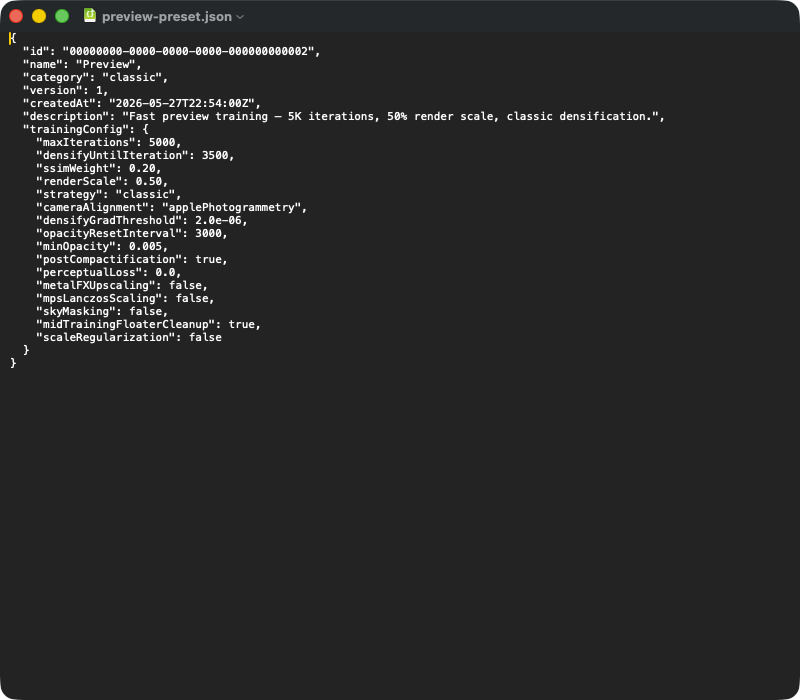
A typical preset JSON export. Top-level fields: id (UUID), name, category (classic | mcmc | sceneClass | custom), version (schema version), createdAt (timestamp), description (free text). The nested trainingConfig object contains the parameters that are critical for reproducibility — on import, the entire block is read into the training configuration, and default values from the app version fill in any fields missing from the JSON (e.g. after an app update). Anyone handing a preset over to another Mac simply sends across this JSON file.
The training configuration is the heart of every training run in RadianceKit. It brings together every parameter that influences training — from the maximum iteration count through the eight learning rates to the special fields for MCMC, Mip-Splatting, the curriculum, and the scene-aware cap logic. You edit it in the sidebar, in the Training Configuration section (Expert View), save it as a preset, or pass it on to another Mac as a JSON export. During training, exactly this object is frozen and handed to the GPU backend.
This chapter is reference material for power users. It lists the 80 adjustable fields of the training configuration, the 9 bundled presets, and the scene-dependent resolution of the Gaussian cap. When in doubt, the value set by the chosen preset applies — you can see it in the Inspector or in the preset's JSON export.
Table of contents:
+ Iteration (T1–T2) + Learning Rates (T3–T10) + Densification — Classic (T11–T16) + Loss (T17–T20) + SH Degree Progression (T21) + Performance (T22–T24) + Diagnostics and Point Cloud Preparation (T26–T30) + Regularization (T31–T37) + Refinement (T38–T44) + Sky Dome (T45–T48) + Adam + LR Schedule (T49–T55) + Post-Processing + Apple AI (T56–T60) + MCMC Densification (T61–T73) + Mip-Splatting (T74–T76) + Adaptive Densification (T77–T79) + Curriculum (T80–T81) + Static Presets (TP1–TP9) + How the App Determines the Gaussian Cap + Which Field for What? (Cheat Sheet) + Dangerous Fields
Iteration (T1–T2)
T1maxIterations
DETAILS
Default: 30,000 (Initializer), 35,000 (.full), 200,000 (.fullMCMC) Range: 1,000 – 500,000 (UI slider), no hard upper limit in the logic
TECHNICAL
Total number of training iterations the backend runs through. An iteration means a forward render of a single training camera, a backward pass over all loss components (L1 + SSIM + optional regularizations + sky mask), and one Adam optimizer step. This number directly affects the other schedules: the position learning rate follows a cosine-annealing curve from 0 to either T1 itself or to T50 positionLRScheduleEndIteration; densification stops at T2 densifyUntilIteration; MCMC noise decay ends at T69 mcmcNoiseDecayEnd; SH-degree upgrades happen at the three marks defined in T21. With classic densification, the proven range is 20,000–35,000 iterations; with MCMC it's 60,000–200,000. Drastically raising this beyond the values baked into the presets rarely brings extra quality — Adam momentum saturates, and without an LR-decay end the loss stagnates. Conversely, going below ~5,000 leads to incompletely converged geometry (density control has too little time to clone/split).
T2densifyUntilIteration
DETAILS
Default: 15,000 (Initializer), 5,000 (.full), 160,000 (.fullMCMC) Range: 0 – T1 maxIterations
TECHNICAL
Iteration at which densification stops. Up to this point, Gaussians are cloned, split, and pruned according to the rules parameterized in T11–T16 (Classic) or T67–T70 (MCMC); afterward the Gaussian count stays constant and only positions, rotations, scales, opacities, and SH coefficients continue to be optimized (refinement phase). In the original 3DGS paper, the value is 50% of T1; in RadianceKit's .full preset it's only ~14% (5,000 of 35,000): after around 5,000 iterations, further densification tends to worsen the result — more floaters, more memory usage, no quality gain. MCMC, on the other hand, lets relocation run until 80% of T1, because MCMC doesn't produce harmful floaters. If T2 is chosen too small (< 1,000), too few Gaussians are created; too large with Classic (> 50% of T1) leads to overgrowth and RGB saturation outliers (see outdoor overtraining findings).
Learning Rates (T3–T10)
T3positionLearningRate
DETAILS
Default: 0.00016 Range: 1e-7 – 1e-3 (recommended)
TECHNICAL
Adam learning rate for the XYZ position of every Gaussian at the start of training (iteration 0). Follows a cosine-annealing curve and decreases over the course of training down to T4 positionLearningRateFinal. The default 0.00016 comes from the original 3DGS paper (Kerbl et al.~2023) and should not be scaled in RadianceKit even when the image resolution is increased — the position moves within world coordinate space, not in pixel space. A significant increase (> 0.0005) causes Gaussians to jump over long distances and makes the loss unstable; values well below that (< 0.00005) mean that incorrectly initialized point clouds never find their place. For the vast majority of scenes, the default value is therefore the right choice. Note: with .fullMCMC we deliberately leave this value at the default — MCMC needs constant learning rates for its relocation logic, so tuning this achieves nothing.
T4positionLearningRateFinal
DETAILS
Default: 0.0000016 (Initializer + paper), 0.000016 (.full, .fullMCMC — 10× higher) Range: 0 – T3 positionLearningRate
TECHNICAL
Final value of the position LR cosine-annealing curve. It is reached either at T1 maxIterations or, if set, at T50 positionLRScheduleEndIteration. RadianceKit's .full preset uses 0.000016 — i.e., 10× higher than the paper default 0.0000016. Both a significantly smaller final value and a significantly larger starting value noticeably worsen the result. The high final value is not a trade-off, but a deliberate choice: with too strong a decay, Gaussians lose their ability during the refinement phase to adapt to newly added densification candidates. The schedule phase can be shortened (T50 < T1), so that T4 is already reached before the end of training and the rest of training runs at constant mini-LR — typical configuration: T50 = 20 000, T1 = 35 000, so refinement runs at 0.000016 for 15 000 iterations.
T5shDCLearningRate
DETAILS
Default: 0.0025 (Initializer + paper), 0.005 (.full and all MCMC presets — 2×) Range: 0.0001 – 0.05
TECHNICAL
Adam learning rate for the DC component (degree 0, i.e., constant albedo) of the spherical-harmonic color. SH-DC corresponds to the direction-independent base tone of a Gaussian, so to speak the "base color". RadianceKit doubles the paper default in the quality presets — this accelerates color convergence, which is necessary because with short training runs (< 5 000 iterations) SH-DC otherwise doesn't come into shape. Unlike the geometric LRs, SH-DC has no decay; the learning rate remains constant across all iterations (or only follows the optional extended-phase decay from T51). Even significantly higher values (around 0.01) worsen the result again and make the colors unstable.
T6shRestLearningRate
DETAILS
Default: 0.000125 (Initializer + paper), 0.00025 (.full and MCMC — 2×) Range: 0.000001 – 0.005
TECHNICAL
Adam learning rate for the higher-order SH coefficients (degree 1, 2, 3 — i.e., the view-direction-dependent color components responsible for highlights, reflections, and smooth shading). 20× smaller than T5 per paper convention, because these coefficients grow quadratically in count (3 for degree 1, 5 for degree 2, 7 for degree 3 → 15 floats per Gaussian total) and without a smaller learning rate would oversaturate the image. Unlocked in two steps — up to the first mark in T21 shDegreeUpgradeIterations only degree 0 is active (i.e., only T5), then 1, later 2, finally 3. Low values here are especially important on scenes with a lot of diffuse lighting; for very glossy surfaces (car paint, water) it's not worth adjusting — the SH representation itself is limited.
T7opacityLearningRate
DETAILS
Default: 0.05 (Initializer + paper), 0.1 (.full, MCMC — 2×) Range: 0.001 – 1.0
TECHNICAL
Adam learning rate for the logit opacity of every Gaussian. The app stores opacity as an unbounded float value and transforms it into [0, 1] using sigmoid; the LR acts in logit space. The quality presets double the paper default to 0.1; this makes pruning more efficient — dead Gaussians fall below the T14 pruneOpacityThreshold more quickly. Which value works best here depends on the Adam configuration; the interaction of the two is not trivial. Low values (< 0.01) cause "dead" Gaussians to linger forever and consume memory; too high values (> 0.5) can lead to opacity explosion, which is why the optimizer firmly clamps the logit value to [-15, 3].
T8opacityLearningRateFinal
DETAILS
Default: 0.0 (= "no decay") Range: 0 or 0.001 – T7 opacityLearningRate
TECHNICAL
Optional cosine-decay final value for the opacity LR. If 0.0, decay is disabled and the opacity LR remains constant throughout training at T7. A decay from 0.1 to 0.01 noticeably worsens the result; that's why the default is "off". The hypothesis behind this field: during the refinement phase, constant opacity LR could lead to oscillation, so that splats that have already reached the right degree of transparency get shifted again by random gradient fluctuations. Empirically, this is not confirmed — the logit-clamping logic already catches this anyway. The field remains available for future experiments; even very long MCMC runs (> 500K iterations) might benefit from it.
T9scaleLearningRate
DETAILS
Default: 0.005 (Initializer + paper), 0.01 (.full, MCMC — 2×) Range: 0.0001 – 0.1
TECHNICAL
Adam learning rate for the three scale components of each Gaussian in log space (RadianceKit stores log(scale), so that scales remain positive). The paper default 0.005, doubled in RadianceKit to 0.01 for better scale convergence with the tuned learning-rate configurations. If the value stays at the paper default alongside the other quality learning rates, noticeably too few Gaussians are created — density control can't clone, because the scale updates catch up too slowly. Scale controls the extent of each Gaussian — too fast learning leads to "needle" Gaussians (extremely long thin splats, see T34 scaleRatioPruneThreshold), too slow learning leaves splats too compact and density control has to split too often.
T10rotationLearningRate
DETAILS
Default: 0.001 (Initializer + paper), 0.002 (.full, MCMC — 2×) Range: 0.0001 – 0.05
TECHNICAL
Adam learning rate for the four quaternion components of every Gaussian. The quaternion is renormalized (L2 norm = 1) after each Adam update step — otherwise the covariance matrix would degenerate. RadianceKit doubles the paper default in the quality presets, because rotation has smaller absolute gradient magnitudes than scale / position (on the unit sphere every step stays short) and without 2× the rotation would be significantly under-converged within the 35 000-iteration window. On NeRF-Blender scenes (Lego, Chair) rotation has a particularly noticeable effect — the edges of objects only align correctly after 5 000–10 000 iterations.
Densification — Classic (T11–T16)
T11densifyGradThreshold
DETAILS
Default: 0.000002 (Initializer, calibrated for 0.5× resolution), 0.0000011 (.full, calibrated for 1.0×), 0.000004 (.quickTest, calibrated for 0.25×), 2e-7 (.fullClassicPaper) Range: 1e-8 – 1e-3 (resolution-dependent)
TECHNICAL
Threshold for the L2 norm of the screen-space-projected position gradient, above which a Gaussian is marked for cloning or splitting. The absolute value depends directly on the training resolution — it scales roughly like 1/resolution² (more pixels = smaller per-pixel gradients). This is why every T22 trainingRenderScale level needs a calibrated threshold: 0.25× → 4e-6, 0.5× → 2e-6, 1.0× → 5e-8 … 1.1e-6 (.full). The paper default of 0.0002 is NDC-normalized and not directly comparable within RadianceKit's world-space pipeline. With the T52 adaptiveDensifyThreshold flag, the value can be computed at runtime from the p98 of the current gradient distribution — however, on real scenes this causes the Gaussian count to collapse dramatically (mass pruning); the flag stays off. T77–T79 provide an alternative adaptive logic via rolling median. This field is not harmless — halving it produces 2–4× more Gaussians (memory pressure, OOM risk); doubling it can under-densify the scene.
T12densifyFromIteration
DETAILS
Default: 500 Range: 100 – 5,000
TECHNICAL
First iteration at which densification becomes active. Before that, only "plain" learning happens on the initial SfM point cloud, without creating new Gaussians. The default of 500 comes from the 3DGS paper and gives the initialization time to stabilize — if densification starts as early as iteration 0, incorrectly positioned SfM points would clone themselves many times over before they even find their proper place. A significantly later start (around 1,000) slightly worsens the result; stick with the default.
T13densifyInterval
DETAILS
Default: 100 (Initializer, MCMC), 200 (.full) Range: 50 – 1,000
TECHNICAL
How many iterations lie between two densification steps. Paper default is 100 — every 100 iterations, the list of densify candidates is evaluated, cloned/split, and at the same time the list of prune candidates (sigmoid(opacity) < T14 pruneOpacityThreshold) is removed. For .full, 200 has proven effective — this relieves the GPU, because fewer reorganization passes run, and gives each Gaussian more time to settle after a cloning action. Shorter intervals lead to over-densification in the Quality setup: significantly more Gaussians are created without the image getting better. With MCMC, the same field is interpreted as the relocation interval; see T67 mcmcRelocationInterval for the MCMC-specific logic.
T14pruneOpacityThreshold
DETAILS
Default: 0.005 (Initializer, Paper, MCMC), 0.001 (.full) Range: 0.0001 – 0.1
TECHNICAL
Sigmoid opacity threshold below which a Gaussian is deleted at the next densification step. Works together with T7 opacityLearningRate and the logit-clamp logic in the optimizer. In .full, the value is 0.001 instead of 0.005 — splats that only matter under exotic viewing angles are thus preserved longer and contribute to SH detail. Even smaller values (e.g. 0.0001) don't help anymore: too little gets pruned and memory is wasted. Important: density control must ALWAYS prune, even if the buffer capacity is already full due to other measures — otherwise dead Gaussians accumulate and the count freezes.
T15opacityResetInterval
DETAILS
Default: 3,000 (Initializer + Paper), 100,000 (.full = effectively disabled), 200,000 (.fullMCMC = disabled) Range: 1,000 – 100,000+
TECHNICAL
Every how many iterations the opacity of all Gaussians is reset to a low value (~0.01) — a measure from the 3DGS paper to reassess "frozen" splats. Together with RadianceKit's warmup, the stochastic training setup, and the doubled learning rates, the opacity reset noticeably costs quality, and the logit clamp in the optimizer already covers its function anyway. Therefore it is practically disabled in .full (100,000 > 35,000 = never triggered). In .fullClassicPaper (paper-faithful variant), it is deliberately set back to 3,000 — there, the goal is to reach the Gaussian budgets of the original paper.
T16maxScreenSize
DETAILS
Default: 0.0 (= disabled) Range: 0 (off) or > 0
TECHNICAL
Maximum screen-space size (in projected pixels) that a Gaussian is allowed to reach before it is forcibly split. The value is set to 0 — RadianceKit's density control instead uses the world-space scale threshold from the same gradient logic. It remains in the field catalog because future experiments with mip splatting (T74–T76) or scene-specific splatting strategies might benefit from it. Enabling it (value > 0, e.g. 20) would force splats that have grown very large on screen to split — relevant for large, smooth wall surfaces, where a single giant splat provides too little detail.
Loss (T17–T20)
T17ssimWeight
DETAILS
Default: 0.2 (Initializer + Paper + .full), 0.05 (all MCMC presets) Range: 0.0 – 1.0
TECHNICAL
Weight of the D-SSIM component in the combined loss function loss = (1 - λ) * L1 + λ * D-SSIM, where λ = T17. The 3DGS paper default of 0.2 is the right choice for Classic Densification — even 0.3 noticeably worsens the result. For MCMC, however, the right value is 0.05, because MCMC's stochastic exploration needs a stronger L1 signal component — higher SSIM weights would dilute the relocation decisions. SSIM is significantly more expensive to compute than L1 (local 11×11 windows across the whole image); RadianceKit uses an MPS-accelerated implementation that stays under 1 ms per 1080p image. The Scene-Class presets use scene-specific values between 0.082 (.outdoorPreset) and 0.171 (.indoorPreset).
T18ssimWeightRefinement
DETAILS
Default: 0.0 (= "no change, keep ssimWeight") Range: 0 or 0 – 1.0
TECHNICAL
Optional SSIM value for the refinement phase after T2 densifyUntilIteration. Raising 0.2 to 0.3 during the refinement phase worsens the result in both metrics — L1 as well as SSIM; that's why the default is 0.0. The hypothesis behind the field was that after densification — once no new Gaussians are being created — a stronger SSIM component would maximize structural sharpness. Empirically false: increasing the SSIM weight indirectly means lowering the L1 weight, and L1 is the far more meaningful signal in the final refinement phase. The field remains available for future experiments with perceptual loss (T60) or edge loss (T19), where a refinement-specific loss composition might make sense.
T19edgeLossWeight
DETAILS
Default: 0.0 (= disabled) Range: 0 or 0.001 – 1.0
TECHNICAL
Experimental loss term: weight of a Sobel gradient-domain L1 loss that directly compares image edges (ground-truth Sobel vs render Sobel) in addition to L1+SSIM. Hypothesis: edge information is a perceptual cornerstone of image quality and an explicit term should encourage Gaussians to hit edges better. In practice it achieves nothing: a noticeable weight (0.1) worsens the result, a small one (0.01) doesn't change quality at all, yet still costs compute time. The Sobel pass costs an additional MPS forward pass on ground truth and render. Hence permanently disabled. Future use case: scenes with hard artificial edges (architecture, furniture, renderings) could benefit — however, the Scene-Class presets don't use this term for that purpose; instead they scale the SSIM weight.
T20skyMaskingEnabled
DETAILS
Default: false (Initializer and all presets) Range: boolean
TECHNICAL
Turns on sky masking. This uses the Apple Vision framework to mask out the sky region in each image, and sets the loss to zero in that area. The point: outdoor scenes often suffer because blue/gray/white sky pixels prompt the app to place Gaussians exactly there — which is perceived as a "floater." Without a sky mask, the loss in this region would never be zero, because the sky varies slightly across the image and the app endlessly tries to reconstruct it with splats. The Vision mask is computed once per camera before training and kept in RAM. It's typically activated together with T45 skyDomeEnabled (UI logic in the settings view). For indoor scenes or synthetic renderings, leave it disabled — the mask would incorrectly detect ceilings or walls as "sky" there.
SH Degree Progression (T21)
T21shDegreeUpgradeIterations
DETAILS
Default: [1_000, 2_000, 3_000] (Initializer), [2_000, 5_000, 8_000] (.full, MCMC), [1_000, 2_000] (.preview — Degree 3 skipped) Range: [Int], each value in [0, maxIterations], monotonically increasing
TECHNICAL
Iterations at which the active SH degree is stepped up from 0→1, 1→2, 2→3. Before the first mark, only the DC components are active (i.e. T5 shDCLearningRate); after the first mark, the DC + 3 degree-1 coefficients; after the second mark, + 5 degree-2 coefficients; after the third mark, all 15 coefficients. The memory footprint per Gaussian grows in stages accordingly — 4 floats → 16 floats → 36 floats → 64 floats. The quality presets delay the upgrades compared to the initializer defaults, because the geometry should stabilize first, before the color details with their higher frequency are added. The earlier marks [1K, 2K, 3K] produce a noticeably worse result in .full. .preview caps at degree 2, because degree 3 doesn't converge in 5,000 iterations and only consumes optimizer capacity. The curriculum (T80–T81) offers an alternative logic that dynamically overrides this list.
Performance (T22–T24)
T22trainingRenderScale
DETAILS
Default: 1.0 (Initializer, .full, MCMC, Scene-Class), 0.5 (.preview), 0.25 (.quickTest) Range: 0.05 – 2.0 (typically 0.25, 0.5, 1.0)
TECHNICAL
Render resolution during training relative to the original resolution of the training images. At 0.5, each image is downsampled to 50 % width × 50 % height (i.e. 25 % of the pixels), and the Gaussian rendering happens at this smaller resolution. Reduces both memory and compute cost quadratically. Important: T11 densifyGradThreshold must match the chosen resolution — gradient magnitudes scale with 1/resolution², so .quickTest (0.25×) has a much higher threshold (4e-6) than .full (1.0×, 1.1e-6). RadianceKit warns on very large images and adjusts automatically — 3 MP target resolution. For extreme 4K input images, 0.5 or even 0.25 would make sense, otherwise every Mac ends up doing nothing but CPU compaction.
T23resolutionWarmupScale
DETAILS
Default: 0.0 (= disabled) Range: 0 or 0.1 –
TECHNICAL
Train the densification phase (iter 0 to T2) at a lower resolution than the refinement phase. For .full this is switched off, because at T22 = 1.0 with cosine annealing the time savings are minor and quality suffers slightly. It remains in the field catalog because it could become useful again with 4K inputs and long training runs — the curriculum (T80) picks up a similar logic, but there it is coupled to the LR schedule. If enabled and T80 curriculumResolutionRamp is also true, the curriculum wins and overrides this value.
T24tileSize
DETAILS
Default: 16 Range: 8, 16, 32
TECHNICAL
Size of the rasterization tiles in pixels. The Gaussian splatting rendering is tile-based: the image is broken up into 16×16-pixel tiles, each tile collects the Gaussians relevant to it, sorts them by depth, and blends them in. 16 is the standard used by practically all 3DGS implementations and is hardcoded in the RadianceKit Metal kernels; changing this value would require recompiling the shaders and is not effective in the current state. Remains as a field in case a future engine version supports tile size dynamically.
Diagnostics and Point Cloud Preparation (T26–T30)
T26depthDistortionWeight
DETAILS
Default: 0.0 (= disabled) Range: 0 or 0.0001 – 0.05
TECHNICAL
Experimental: weight of a depth-distortion regularization loss. Penalizes Gaussians that are stacked deeply along a render ray but conceptually belong to the same surface — this encourages concentrated depth distributions and reduces floaters. At every strength tested, the result gets worse rather than better. The theoretical advantage — improving multi-view consistency — doesn't materialize in the L1 loss, because the hypothesis implicitly assumes that the SfM geometry is correct and the Gaussians just need to be "stacked" correctly. In practice, the SfM point cloud is usually the weakest component, not the stacking. Remains available for multi-view datasets with especially clean poses (Synthetic, Mip-NeRF 360 with ground truth).
T27singleViewOverfit
DETAILS
Default: false Range: boolean
TECHNICAL
Diagnostic flag: if true, every training iteration forcibly uses camera index 0 instead of a randomly chosen one from the camera pool. Purpose: if the model can't even overfit a single view (i.e., the loss on view 0 doesn't approach zero even after 10,000 iterations), there's a fundamental bug in the forward/backward pass. This switch was used extensively during development of the Metal shaders and the differentiable rasterizer kernels. Today it's only available as a sanity check, if someone has changed something in the training backend and wants to cross-check. There's no toggle for this in the interface — the field is off in all presets and stays that way.
T28maxCameras
DETAILS
Default: 0 (= "use all cameras") Range: 0 or 1 – N
TECHNICAL
Diagnostic limit: train only with the first N cameras, ignore all others. Purpose originally: test the hypothesis that too many cameras create gradient conflicts (too many conflicting loss signals for the same Gaussian). An artificial limit provides no benefit — more frames practically always yield more quality. There's no control for this in the interface; the field is set to 0 in all presets, meaning "all cameras".
T29maxInitialPoints
DETAILS
Default: 0 (= "use all SfM points") Range: 0 or 1,000 – 200,000+
TECHNICAL
Safeguard: limits the number of initial SfM points with which training starts. Dense COLMAP reconstructions can produce > 60,000 points, which with large initial scales leads to 200–300 Gaussians per pixel overlap — this creates a "fog field" in which training does not converge. Subsampling to ~16,000 points (hard-cap logic in the training engine) brings the initial density to the level that the reference 3DGS uses, and dramatically reduces overlap. The app sets this itself for very dense reconstructions; there is no control for it.
T30cameraClusterOutlierMultiplier
DETAILS
Default: 10.0 (all presets — never overridden) Range: 1.0 – 100.0
TECHNICAL
Multiplier for the camera-cluster outlier filter. Before training, the training engine calculates the centroid of all camera positions and the maximum distance of any camera from the centroid. SfM points whose distance from the centroid exceeds multiplier × maxCameraDistance are discarded as outliers. The default of 10× is intentionally generous. A subtle side effect: tighter SfM (cameras closer together) → smaller → smaller threshold → more points are discarded as outliers. Looser SfM → larger threshold → fewer points discarded. This leads to a surprising effect: a tighter, and in itself better, SfM reconstruction can worsen training because too many initial points get discarded. The field is set to 10 in all presets and is not adjustable in the interface. Values below 5 are usually too restrictive, above 20 have no effect.
Regularization (T31–T37)
T31coarseToFineBlurRadius
DETAILS
Default: 0 (= disabled) Range: 0 or 1 – 10
TECHNICAL
Experimental: box-blur radius applied to the ground-truth image at the start of the densification phase and linearly reduced to 0 by the end of densification (T2). Hypothesis: coarse-to-fine training — learning rough structures first, then details — should yield more stable geometry. Across every radius tested, the result gets worse. The reason for the failure: densification decides based on image-domain gradients, and blurring reduces exactly the signals that matter for "clone needed here". Stays in the field catalog for future tests with a different density-control scheme.
T32scaleRegWeight
DETAILS
Default: 0.0 (= disabled) Range: 0 or 0.0001 – 0.05
TECHNICAL
Experimental: L1 regularization on world-space scale. Penalizes Gaussians that grow too large — prevents "mega-splats" that cover entire wall surfaces with a single Gaussian. When enabled, the Gaussian count explodes into the millions and the result gets several times worse. The reason: scale regularization conflicts with density control — smaller scales mean more Gaussians are needed, so density control splits more often, which in turn means more gradient overhead. Disabled, but documented for mip-splatting experiments (T74): in that context, a scale lower bound might make sense.
T33anisotropyRegWeight
DETAILS
Default: 0.0 (= disabled) Range: 0 or 0.0001 – 0.05
TECHNICAL
Experimental: penalty on the max(scale)/min(scale) ratio, meant to prevent extremely elongated "needle" Gaussians that are perceived as floaters. Across every strength tested, the result gets noticeably worse. The reason: regularization forces splats toward a "round" shape, which is exactly wrong on a flat surface (wall, table, floor) — there, a flat, wide Gaussian is more efficient than a spherical one. Disabled. T34 scaleRatioPruneThreshold pursues the same goal more precisely, but is also off by default.
T34scaleRatioPruneThreshold
DETAILS
Default: 0.0 (= disabled) Range: 0 or 5.0 – 100.0 (typically 10.0 – 30.0)
TECHNICAL
Experimental post-training pruning that deletes every Gaussian whose max(scale)/min(scale) ratio exceeds the linear threshold set here. Targets extremely elongated "needle/disc" floaters that cannot be eliminated by regularization alone. In testing, the pruning removed floaters as hoped, but at the same time also removed sensible flat splats on walls and floors — the image became more holey. Hence off by default. Since version 1.8 there's a dedicated toggle for this, Remove Needle/Disc Floaters, in the Inspector's "Training" section, under the subline "Runs automatically at the end of training". When enabled it works deliberately conservatively (only splats whose longest axis exceeds roughly 50× the shortest) and takes effect starting with the next training run.
T35opacityRegWeight
DETAILS
Default: 0.0 (= disabled) Range: 0 or 0.0001 – 0.05
TECHNICAL
Experimental: binary cross-entropy penalty that pulls opacity toward 0 or 1 (i.e. away from "semi-transparent"). Hypothesis: a sharper opacity distribution would improve image clarity. Together with T33, this regularization costs quality; both are disabled. Caution: in 1.4.3-Beta a bug appeared that changed exactly this field's default value (initializer = 0.01), which led to a mass extinction of the Gaussian count (460 K → 5 in a single iteration). Since 1.4.4 it is permanently pinned to 0.0 as the default.
T36opacityDecayFactor
DETAILS
Default: 0.0 (initializer = disabled), 0.9995 (.full, .classicBalanced — HTGS standard) Range: 0 (off) or 0.95 – 1.0
TECHNICAL
Implementation of the HTGS scheme (Hierarchical Time-Gating, Eurographics 2025): every T37 opacityDecayInterval iterations, each Gaussian's sigmoid opacity is multiplied by this factor. 0.9995 × 100 applications yields ~95% retention per densification phase — a light but steady downward pressure on all opacities, reliably driving weakly-contributing Gaussians below the T14 pruneOpacityThreshold. The result is a distinctly better outcome than without decay. Only active during the densification phase (until T2); after that, training continues without decay so that opacities established during refinement remain stable. Not used with MCMC (MCMC has its own mechanisms via T67 mcmcRelocationInterval + T68 mcmcDeadOpacityThreshold).
T37opacityDecayInterval
DETAILS
Default: 50 Range: 10 – 500
TECHNICAL
Iteration interval at which T36 opacityDecayFactor is applied. HTGS paper default is 50, kept in .full. Long intervals (>200) partially undo the effect, because enough gradient updates happen between two applications that opacity rises again. Shorter intervals (<20) make decay too aggressive. Only active during the densification phase.
Refinement (T38–T44)
T38gradientAccumulationSteps
DETAILS
Default: 1 (= "one view per Adam step") Range: 1 – 8
TECHNICAL
Number of views whose gradients are accumulated before an Adam update is performed. At > 1, the app runs on a separate, "unfused" backward-project path that sums the gradients in a separate buffer; the final application scales by 1/N to keep the magnitude constant. In classic training, a value of 2 brings no quality gain but costs time, because the unfused path is more expensive than the fused one. With MCMC, however, accum = 2 noticeably narrows the quality gap to Classic — which is why it's offered there as a toggle. In the presets, the value is set to 1. In the interface you reach it via the MCMC Quality toggle in the "Training" Inspector section: enabled, the app accumulates 2 views per step; disabled, 1. Values other than 1 and 2 can only be set via an edited preset.
T39testViewIndices
DETAILS
Default: [] (= empty, all views are used for training) Range: Set<Int>, any subset of the camera indices
TECHNICAL
Set of camera indices that are NOT used for training but held out for PSNR/SSIM/LPIPS evaluation. Only populated in internal benchmark runs: then every eighth view, starting at index 0 (LLFF standard, identical to the Mip-NeRF-360 and 3DGS paper conventions). As shipped, the field stays empty — training uses all views, and there is no control for this in the interface. Caution: manually setting this field in a preset file without understanding the indices renders a measurement useless (e.g. if all indices above N are set while there are only N-50 views → no holdouts → no evaluation). During your own preset export, testViewIndices is not written along, because it's scene-dependent and would otherwise leave meaningless values between different datasets.
T40refinementPruneInterval
DETAILS
Default: 0 (= disabled) Range: 0 or 100 – 5 000
TECHNICAL
Every N iterations during the refinement phase (after T2), an additional prune pass is run that removes Gaussians with sigmoid(opacity) < T41 refinementPruneOpacityThreshold. Purpose: during densification there are regular density-control calls, but not afterwards — Gaussians whose opacity keeps dropping, however, remain in the buffer. In practice, this additional pruning is harmful: together with the second densification phase (T54), it can completely clear out the Gaussian population. It's set to 0 in all presets and is not adjustable in the interface; if you set it anyway via an edited preset file, 1 000 or 2 000 are sensible values.
T41refinementPruneOpacityThreshold
DETAILS
Default: 0.0 (= "use T14") Range: 0 or 0.001 – 0.1
TECHNICAL
Separate opacity threshold for refinement pruning. After densification, most Gaussians have reached a noticeably higher opacity (> 0.001), so the default T14 pruneOpacityThreshold would be too lenient. If T40 is active, this field determines its own threshold. At 0.0, T14 is used instead. Only relevant if T40 > 0.
T42midTrainingCompactificationIterations
DETAILS
Default: [] (= disabled) Range: [Int], values in (densifyUntilIteration, maxIterations)
TECHNICAL
Explicit iteration points during the refinement phase at which a compactification pass runs (removes sigmoid(opacity) < 0.01 + outlier-scale Gaussians, the same logic as T56 postTrainingCompactification). Purpose: long refinement phases can show confetti/floater accumulation, whose SH then overfits to view-specific artifacts. Typical configuration if enabled: [10000, 20000, 30000] for 40K Classic. BUT: freely chosen cleanup marks consistently worsen the final result — the Gaussian count does drop noticeably, but the image error rises more strongly. As a freely choosable iteration list, the field therefore stays empty in all presets. You achieve the effect itself in the interface via the Floater Cleanup toggle in the "Training" Inspector section: for classic runs of 30 000 or more iterations, it places two cleanup passes in the middle of training. Custom marks can only be set via an edited preset file.
T43frustumCullEnabled
DETAILS
Default: false Range: boolean
TECHNICAL
After training, all Gaussians lying outside the union of all training-camera frusta are removed. Such Gaussians were never constrained by the loss signal and are always floaters. Especially effective for scenes where the novel view lies behind or beside the camera path (e.g. the back side of a linear drone flight) — the floaters there are never visible during the training phase, but very much so when moving around later in the 3D viewer. On drone flights this noticeably reduces floaters, hence it's available as an opt-in. Default false, because for object captures with full orbit coverage the frustum union spans the entire scene and the feature removes nothing — offered in Settings under "Floater Reduction". The outdoor preset doesn't enable it, because the sky dome solves the same problem better there.
T44frustumCullExpansion
DETAILS
Default: 1.1 Range: 1.0 – 2.0
TECHNICAL
NDC margin for T43 frustumCullEnabled. 1.0 would cut exactly at the image edge, which would trim wobbly splats at the image edge too aggressively. 1.1 = 10 % padding beyond the exact camera framing — gives some tolerance for edge pixels that might still become visible in a slightly offset novel view. Values > 1.2 make the cull practically ineffective, because the expanded frustum encompasses far more space.
Sky Dome (T45–T48)
T45skyDomeEnabled
DETAILS
Default: false (initializer + all presets except P9 Outdoor) Range: boolean
TECHNICAL
Before training starts, a spherical point cloud is generated (Fibonacci sphere with T46 sample points), placed at a radius of T47 skyDomeRadiusMultiplier × scene_extent around the scene center and initialized with the colors from the sky-masked pixels of all training cameras (see T20 skyMaskingEnabled). These sky dome Gaussians are inserted at the beginning of the Gaussian buffer and are "frozen" during training (position/scale/rotation gradients = 0, only SH and opacity remain optimizable). Effect: instead of black "confetti" regions in the distance, the user sees a real sky in novel views. This works very well on drone and landscape scenes; in the Outdoor preset (P9) it's on by default. Leave it off for indoor scenes — the sphere would just hang pointlessly outside the room.
T46skyDomeSampleCount
DETAILS
Default: 5,000 Range: 1,000 – 50,000 (typically 2,000 – 10,000)
TECHNICAL
Number of Fibonacci sphere sample points on the sky dome sphere. Higher values → denser sky dome (better for large resolutions and lots of visible sky), but higher memory requirements. 5,000 is the sweet spot for 4K renders; at lower resolutions, 2,000–3,000 is enough. The points are initialized by cosine distance to each training camera's view vector using the corresponding sky-masked pixels — sample points whose view cone isn't seen by any camera remain at a low initial opacity value in the back, but are not modified during training (frozen).
T47skyDomeRadiusMultiplier
DETAILS
Default: 30.0 (initializer + most presets), 59.0 (P9 Outdoor) Range: 5.0 – 200.0
TECHNICAL
Radius of the sky dome sphere relative to the scene extent (= mean distance between camera positions). 30 = the sphere has 30 times the diameter of the camera cloud. Too small (< 5) → the sky dome interferes with the scene itself (e.g. a sky dome splat ends up in the foreground); too large (> 100) → float32 precision loss at the sky dome positions, causing render glitches in the distance. For wide outdoor scenes, 59.0 is the appropriate value — the default 30.0 is too small for deep landscapes, causing the sky dome pixels to render visibly as a "wall" at the edges of the frame.
T48frozenGaussianCount
DETAILS
Default: 0 (= no frozen Gaussians) Range: 0 or 1 – T46
TECHNICAL
Number of Gaussians at the beginning of the buffer whose position/scale/rotation gradients are set to zero in the optimizer — they remain spatially rigid throughout the entire training. Density control may not clone, split, or prune them. Used for sky dome injection (see T45): when the sky dome is on, this field is automatically set to T46 skyDomeSampleCount. Manual setting is possible (e.g. to freeze a pre-placed point cloud from a LiDAR scan), but it's not directly accessible in the UI. Important: the first N Gaussians in the buffer are always the frozen ones — the order in the buffer decides this, not an explicit index.
Adam + LR Schedule (T49–T55)
T49adamResetIteration
DETAILS
Default: 0 (= disabled) Range: 0 or 100 –
TECHNICAL
Iteration at which the Adam optimizer momentum accumulators (m1, m2) are reset to zero. Bias correction afterward runs with (iter - adamResetIteration) instead of iter. A reset after the end of densification noticeably worsens the result. Reason: the Adam momentum that built up during densification carries information about the typical gradient magnitudes and speeds up the refinement phase. Discarding it costs the first ~500 refinement iterations in convergence. That's why it's set to 0 in all presets and is not adjustable in the interface.
T50positionLRScheduleEndIteration
DETAILS
Default: 0 (Initializer = "use maxIterations"), 20 000 (.full — cosine ends at 20K despite maxIter=35K), 30 000 (.fullClassicPaper) Range: 0 or 1 000 –
TECHNICAL
Iteration at which the cosine annealing curve for position LR reaches its minimum. If 0, this is identical to T1 maxIterations. If > 0, the schedule runs up to this value and then stays constant at T4 positionLearningRateFinal afterward. This allows an "extended refinement phase" with a minimal but constant learning rate — refining positions slowly without renewed decay. .full does this (schedule end at 20K, training runs until 35K); in the neighborhood — 15K to 25K — barely anything changes, 20K is the best compromise. Used in conjunction with T51 to also modify the non-position LRs in the extended phase.
T51extendedPhaseLRDecay
DETAILS
Default: 0.0 (= disabled, constant LRs) Range: 0 or 0.01 – 1.0
TECHNICAL
Minimum multiplier for the non-position LRs (scale, rotation, opacity, SH) in the "extended phase" — i.e., after T50 is reached and position LR is already at T4. If 0.1, scale/rotation/opacity/SH are themselves cosine-decayed from 1.0 (= their standard LR) to 0.1× their standard. If 0.0 (default), they remain constant. Full decay to zero delivers the same result as no decay at all — the behavior appears cleaner with decay, but isn't measurably better. That's why it's set to 0 in all presets and is not adjustable in the interface.
T52adaptiveDensifyThreshold
DETAILS
Default: false Range: boolean
TECHNICAL
Experimental: if true, the app calculates the p98 of the current gradient distribution in every densification step and uses it as a dynamic threshold (clamped to at least 0.5× the configured value from T11, so it doesn't drift too far). Hypothesis: automatic adaptation to the current scene phase would make density control more robust — e.g., stricter pruning at the start, looser later, or vice versa. In practice, the Gaussian count collapses dramatically — mass pruning, because the p98 is extremely high in the first iterations and afterward almost nothing exceeds the threshold anymore. The fixed threshold is already well calibrated; dynamic adjustment does more harm than good. T77 offers an alternative adaptive logic via rolling median that avoids this problem.
T53mergeAfterDensification
DETAILS
Default: false (Initializer), true (.full, .classicBalanced, .fullClassicPaper) Range: boolean
TECHNICAL
At the end of the densification phase (iter T2), a one-time merge pass is performed that combines Gaussians that are close together with similar scale and color. Reduces the Gaussian count typically by 5–15 % without visible quality loss. Purpose: after intensive cloning, clusters of quasi-identical Gaussians emerge that contribute nothing new — merging frees up optimizer capacity for other areas. Standard in Classic Quality presets. Not used with MCMC, because MCMC's relocation logic prevents such clusters from forming in the first place.
T54densifyPhase2FromIteration
DETAILS
Default: 0 (= disabled) Range: 0 or T2 – T1
TECHNICAL
Experimental: enables a second densification phase that starts at this iteration after the refinement pause and runs until T55. Hypothesis: after a refinement phase, the gradient accumulators have more stable magnitudes and can more precisely indicate which areas still need additional Gaussians. In practice, the second densification phase ends in a cascade down to zero Gaussians — together with the refinement pruning (T40), it empties the buffer. That's why it's set to 0 in all presets and is not adjustable in the interface.
T55densifyPhase2UntilIteration
DETAILS
Default: 0 Range: 0 or T54 – T1 Defined in:
TECHNICAL
End of the second densification phase. Only relevant when T54 > 0. Both fields together disabled.
Post-Processing + Apple AI (T56–T60)
T56postTrainingCompactification
DETAILS
Default: true (in all production presets), false (.quickTest, .preview) Range: boolean
TECHNICAL
After training ends, Gaussians with sigmoid(opacity) < 0.01 are hard-removed (they contribute practically nothing to the image anymore). Reduces Gaussian count by typically 58 % and export file size by 55 % without visible quality loss. Enabled by default in production presets — the final result should be deliverable as compactly as possible. Off in .quickTest, because a diagnostic run isn't exported anyway. Unlike T42 midTrainingCompactificationIterations, compactification happens only at the end — refinement can use all Gaussians until then.
T57metalFXUpscaling
DETAILS
Default: false Range: boolean
TECHNICAL
⚠ Decommissioned since 2026-07-18 and without any effect. The field belonged to the "Viewport Scaling" picker (Off/MetalFX/Lanczos) in the Inspector. The renderer never read it: the blit decision is purely geometric (rendered supersampled ⇒ MPS-Lanczos downsample for edge smoothing, otherwise bilinear), and for the MetalFX path there was no call site at all. The picker and the two false claims it fed have been removed; the overlay label is now "Sampling", not "Scaling", and nowhere in the app is anything upscaled via MetalFX. The field itself remains, because the training configuration is saved in full — it's embedded in every saved scene, in every preset, and in the settings comment of already exported PLYs; deleting it would silently drop the key on rewrite and break that exchange. For the same reason the field is excluded from the "Modified" comparison: an old scene can carry true, and there is no way left to reset it via the UI. Nothing reads it — don't wire it back up.
T58mpsLanczosScaling
DETAILS
Default: false Range: boolean
TECHNICAL
⚠ Decommissioned since 2026-07-18 and without any effect — see T57 metalFXUpscaling, which also explains why the field still has to be saved regardless. An obvious misconception should be explicitly named: the app does indeed use MPS-Lanczos in the viewport, but that is controlled purely by geometry — a supersampled rendered image is downsampled for edge smoothing. That is a downscale, not an upscale, and this field never triggered it.
T59livePreviewInterval
DETAILS
Default: 50 (initializer; presets don't set this field) Range: 0 (off), 50, 250 or 1,000 in the settings picker
TECHNICAL
How often the 3D viewer is updated with the current Gaussians during training. 50 = a new render every 50 iterations — good enough to observe progress without noticeably slowing down training. 0 = the viewer is never updated (background training, maximum speed). For long MCMC runs, 250 or 1,000 are worthwhile, since the update overhead adds up over time. Special role: the field belongs to the training configuration but is an app-wide setting (Settings → Training) and not part of the training recipe. It is therefore excluded from the "Modified" comparison, is preserved across preset switches, and since 2026-07-18 is no longer taken from the file when opening a scene — previously, a loaded scene would silently replace the user's frame rate with that of the scene's author, "Off" included, and there was no second place from which to recover it.
T60perceptualLossWeight
DETAILS
Default: 0.0 (= disabled) Range: 0 or 0.001 – 0.5
TECHNICAL
Weight of a perceptual loss term (multi-scale blur feature matching). Captures structural and textural similarity at a higher level than L1+SSIM — typically where "pixel-perfect" matters less than "looks realistic". The value is 0.0 (off) in all presets. In the UI you set it via the Perceptual Loss slider in the Inspector section "Training", range 0 to 0.20 in steps of 0.01; at 0 the app shows "Off".
MCMC Densification (T61–T73)
T61densificationStrategy
DETAILS
Default: .classic (Initializer + Classic Presets), .mcmc (all MCMC Presets + Scene Class) Range: .classic or .mcmc
TECHNICAL
Chooses between Classic Densification (clone/split/prune, Kerbl et al.~2023) and MCMC Densification (Stochastic Gradient Langevin Dynamics with Relocation, Kheradmand et al.~NeurIPS 2024). With .classic, T11–T16 are evaluated, with .mcmc the T62–T73. Watch out when switching: Classic Defaults and MCMC Defaults are calibrated completely differently — flipping the picker in Expert View without loading a matching Preset risks a 1.4.3-bug-style mass extinction (460 K → 5 in one iteration, because MCMC opacity reg at 0.01 kills the Classic opacities). That's why the MCMC init defaults are deliberately "softened" (all reg values 0.0).
T62mcmcMaxGaussians
DETAILS
Default: 150,000 (Initializer + .fullMCMC + .mcmcBalanced), 100,000 (.mcmcPreview), 1,500,000 (.fullMCMCMip — Mip-Splatting variant with 10× budget), 1.19 M (.renderPreset), 1.25 M (.outdoorPreset), 670 K (.indoorPreset) Range: 0 (= "use buffer capacity") or 10,000 – 5,000,000 Defined in:
TECHNICAL
Hard upper limit for the number of Gaussians under MCMC strategy. The number grows gradually by T70 mcmcGrowthRate (typically 5 %) per relocation step up to this cap. 150 K is a good starting value — significantly above it, splat quality dilutes (too many small, redundant Gaussians); significantly below it, the scene stays under-densified. For very large scenes (e.g., a 1,545-photo drone flight with 158 K SfM init), 150 K is too low — hence the 1.4.5 extension T72 mcmcCapMultiplier + T73 mcmcAutoScaleByScene. The Scene Class Presets use scene-specific values between 670 K (indoor) and 1.25 M (outdoor). At value 0, the engine uses the full buffer capacity as the cap.
T63mcmcNoiseScale
DETAILS
Default: 0.00005 (5e-5 = paper default) Range: 1e-6 – 1e-3
TECHNICAL
Multiplier for the Gaussian noise that is added to the position of every Gaussian in each MCMC iteration (SGLD logic). Higher = more exploration (Gaussians move around more, potentially finding better spots), lower = more exploitation (Gaussians stay where they already are good). 5e-5 is the right value — significantly smaller means too little exploration, significantly larger (1e-4) too much, causing the splats to smear out. It is cosine-decayed over the training time until T69 mcmcNoiseDecayEnd — at the end of the decay range, noise is effectively 0 and the Gaussians converge.
T64mcmcOpacityRegWeight
DETAILS
Default: 0.0 (= disabled in the RadianceKit Defaults, paper: 0.01) Range: 0 or 0.001 – 0.05
TECHNICAL
MCMC-specific L1 penalty on opacity. Paper default 0.01 (pushes unused Gaussians toward zero, making them available for relocation). In RadianceKit, the result is measurably better without this regularization. Reason: the pruning criterion defined by T68 mcmcDeadOpacityThreshold is sufficient on its own — an additional L1 penalty also forces valuable, low-opacity Gaussians to die. Hence default 0. Warning: in the 1.4.3 beta build the initializer default was erroneously 0.01, which resulted in the mass extinction bug (see T61 explanation); fixed to 0.0 since 1.4.4.
T65mcmcScaleRegWeight
DETAILS
Default: 0.0 (= disabled, paper: 0.01) Range: 0 or 0.001 – 0.05
TECHNICAL
MCMC-specific L1 penalty on the scale eigenvalues. Paper default 0.01. Here too, the result is better without regularization, for the same reason as with T64. Disabled in all RadianceKit MCMC Presets. Same caveat as T64: 1.4.3 bug.
T66mcmcRelocationInterval
DETAILS
Default: 100 (Initializer + all MCMC Presets, paper standard), 155 (P9 Outdoor) Range: 50 – 500
TECHNICAL
Iteration interval at which MCMC relocates dead Gaussians (sigmoid(opacity) < T68 mcmcDeadOpacityThreshold) to new positions. Shorter intervals (around 50) are too disruptive, the loss oscillates; significantly longer ones (around 200) rob MCMC of its responsiveness. 100 is the right value. For outdoor scenes it's a bit higher at 155 — the longer intervals give Adam more time to integrate newly placed Gaussians before the next reloc event puts them under pressure again.
T67mcmcWarmupIterations
DETAILS
Default: 500 Range: 100 – 5,000
TECHNICAL
Number of initial iterations during which no MCMC relocation happens. The reloc logic only starts after this warmup. Purpose: in the first iterations the opacity values haven't settled in yet — if reloc started immediately, Gaussians would be placed in the wrong spots and would have to be moved again right away, destroying Adam momentum. Paper default 500. RadianceKit adopts this value because it has proven robust.
T68mcmcDeadOpacityThreshold
DETAILS
Default: 0.005 (Initializer, paper standard), 0.01 (.fullMCMC and all MCMC Presets) Range: 0.001 – 0.05
TECHNICAL
sigmoid(opacity) threshold below which a Gaussian is considered "dead" and eligible for relocation. 0.01 is the right value — 0.005 barely changes anything, 0.02 is worse. Higher = more aggressive reloc (more Gaussians get moved), lower = more cautious. 0.01 corresponds roughly to "0.5 % visual visibility". P10 Indoor uses 0.0142.
T69mcmcNoiseDecayEnd
DETAILS
Default: 0 (Initializer = "no decay"), 160,000 (.fullMCMC = 80 % of 200K), 96,000 (.mcmcBalanced = 80 % of 120K), 40,000 (.mcmcPreview) Range: 0 or 1,000 –
TECHNICAL
Iteration at which the T63 mcmcNoiseScale noise is fully damped down to zero (cosine decay from iter 0 to here). 80 % of maxIterations is the right value — this gives MCMC enough exploration time while letting the last 20 % converge without noise. 0 = constant noise across all iterations (rarely sensible, MCMC can't converge then).
T70mcmcGrowthRate
DETAILS
Default: 0.05 (paper standard = 5 %) Range: 0.01 – 0.2
TECHNICAL
Growth rate of the MCMC population target per relocation step. The logic: at each reloc event, the target population size is increased by (1 + growthRate), until T62 mcmcMaxGaussians (or the variant scaled by T72/T73) is reached. 0.05 is the right value — higher values lead to too-rapid growth (Gaussians get inserted before the Adam momentum can integrate them), lower ones lead to under-densified scenes at the end.
T71mcmcSigmoidK
DETAILS
Default: 100.0 Range: 10.0 – 500.0 Defined in:
TECHNICAL
Sigmoid sharpness parameter for the MCMC noise attenuation. In the SGLD step, per-Gaussian noise is attenuated — highly opaque Gaussians (whose logit is positive) get exponentially less noise than low-opacity ones. K = 100 is sharp, meaning the transition from "full noise" to "no noise" happens very quickly around opacity 0.5. K = 100 is the right value — smaller values (10–50) let even highly opaque Gaussians wobble along (destroying converged Gaussians), larger ones (> 500) make the transition artificially hard and dead Gaussians no longer get moved at all.
T72mcmcCapMultiplier
DETAILS
Default: 3.0 (Initializer + .fullMCMC), 2.0 (.mcmcPreview), 2.5 (.mcmcBalanced), 2.98 (P8 Render), 5.32 (P9 Outdoor), 1.76 (P10 Indoor) Range: 0 (= disabled) or 1.0 – 10.0
TECHNICAL
1.4.5 feature: scene-adaptive cap scaling. If T73 mcmcAutoScaleByScene is true, the effective cap is calculated as (clamped to buffer capacity). Background: for large scenes (e.g., a 1,545-photo drone flight → 158 K SfM init), T62 = 150,000 is too low — density control wouldn't be able to grow at all. With multiplier 3.0 the cap in this example is scaled to 474 K (158 K × 3.0). The Scene Class Presets use scene-specific values: outdoor benefits from a high multiplier (5.32 → ~830 K cap at 156 K init points), indoor makes do with 1.76 (walls saturate faster). For the complete resolution of the cap see the -method.
T73mcmcAutoScaleByScene
DETAILS
Default: true (Initializer + all MCMC Presets) Range: boolean
TECHNICAL
1.4.5 feature: master switch for the scene-aware cap logic (see T72 +). If false, only T62 mcmcMaxGaussians is used as the cap (back to 1.4.4 behavior). On by default, because otherwise the mass extinction issues with large scenes from 1.4.3 would return. Only disable manually if you explicitly want to set a hard cap — e.g., to train a 150 K variant whose final size is predictable.
Mip-Splatting (T74–T76)
Status: Mip-Splatting has not produced a quality gain in practice and has even hurt some outdoor scenes. The fields remain opt-in for experiments; Mip-Splatting is off in all shipped presets.
T74useMipSplatting
DETAILS
Default: false (all production presets), true (.fullMCMCMip — research sibling) Range: boolean
TECHNICAL
Enables Mip-Splatting (Yu et al.~CVPR 2024): a 3D smoothing filter + 2D filter + α-compensation that caps the per-Gaussian frequency at the Nyquist limit of the densest training-camera sampling rate. Theoretical goal: eliminate aliasing when rendering at off-training scales (0.5× or 2× the training resolution). It is enabled and functionally correct in the preprocess- and backward-projection shaders. In practice, though, the hoped-for quality gain never materialised: rendering at the training resolution changes practically nothing, and on outdoor scenes the image actually gets worse. One possible explanation: the 3D smoothing works against MCMC relocation once many Gaussians are in play. The field remains available for your own multi-scale experiments.
T75mipSmoothing3DScale
DETAILS
Default: 0.2 (paper default) Range: 0.05 – 1.0
TECHNICAL
3D smoothing-scale parameter (Yu et al.~§3.3, paper default 0.2). Larger = more world-space smoothing per Gaussian (= more anti-aliasing, but also more blur at the default scale), smaller = sharper but more prone to aliasing. Only consulted when T74 useMipSplatting = true. Not optimised further — even at the paper default of 0.2, Mip-Splatting yields no gain.
T76mipFilter2DVariance
DETAILS
Default: 0.3 (= exactly the previous behaviour) Range: 0.1 – 1.0
TECHNICAL
2D Mip-filter variance that gets added to the Σ_2D diagonal (variance directly, not squared). 0.3 is exactly the value that used to be hardcoded in the kernel prior to Mip-Splatting. When T74 useMipSplatting = false, the kernel ignores this value entirely and writes the hardcoded 0.3 instead — so the previous behaviour is guaranteed to stay unchanged. When it's on, the value set here is used. Remains in the field catalog for Mip sweeps.
Adaptive Densification (T77–T79)
T77adaptiveDensification
DETAILS
Default: false Range: boolean
TECHNICAL
Rolling-median tracker as an alternative to the fixed T11 densifyGradThreshold. When true, in every densify step the current threshold is overwritten with median(last N avgGrad samples) × T79 adaptiveDensifyMultiplier. N = T78 adaptiveWindow. Stricter than the p98 variant from T52, which there triggers mass pruning: median times 2 sits in the settled state at roughly p70–p80 of the gradient distribution. Enabled on its own the field brings no quality gain; together with the curriculum (see T80/T81) it does — there the curriculum carries the gain, this field more the stability. There is no control for it: the field is off in all presets and can only be set via an edited preset file.
T78adaptiveWindow
DETAILS
Default: 1 000 Range: 100 – 10 000 Defined in:
TECHNICAL
Rolling-median window in densification events (NOT iterations — every T13 densifyInterval step delivers one sample). Default 1 000 — with, this means the last 100 000 training iterations contribute to the median, i.e. typically the entire training history up to this point. Early phase (before T78 samples): tracker returns nil → fallback to fixed threshold T11. Only relevant when.
T79adaptiveDensifyMultiplier
DETAILS
Default: 2.0 Range: 1.0 – 4.0
TECHNICAL
Multiplier on the rolling median for the adaptive threshold. Default 2.0 corresponds roughly to p70–p80 of the typical gradient distribution. Lower = more aggressive growth (more clones), higher = stricter (fewer clones). In the range 1.5–3.0, 2.0 is the best value. Only relevant when.
Curriculum (T80–T81)
T80curriculumResolutionRamp
DETAILS
Default: false Range: boolean
TECHNICAL
Die Trainings-Auflösung startet bei 0.5× und wechselt bei T50 positionLRScheduleEndIteration / 2 (oder T1 maxIterations / 2, falls T50 nicht gesetzt) auf T22 trainingRenderScale. Überschreibt T23 resolutionWarmupScale, wenn aktiviert. Von den beiden adaptiven Zugaben (siehe T77) trägt dieses Curriculum den eigentlichen Qualitätsgewinn — die schrittweise Auflösungserhöhung gibt der App Zeit, grobe Geometrie auf der niedrigeren Auflösung zu finden, bevor sie zur feinen Detailarbeit übergeht. In der Oberfläche nicht verstellbar — nur über eine bearbeitete Preset-Datei, und dann sinnvollerweise zusammen mit T81.
T81curriculumSHProgression
DETAILS
Default: false Range: boolean
TECHNICAL
Overrides T21 shDegreeUpgradeIterations with [maxIter/4, maxIter/2, maxIter*3/4], distributing the SH upgrades evenly across the training time instead of front-loading them. Hypothesis: stable geometry gets established before the color-detail explosion, which positions the view-direction-dependent gloss effects more precisely. Together with T77 this yields a gain on some scenes; the gain is carried by this field, T77 alone isn't enough. Not adjustable in the interface — only via an edited Preset file.
Static Presets (TP1–TP9)
Here you'll find only the structural differences from the initializer default. The full marketing description of the eleven UI presets P1–P11 is in Chapter 7.
TP1.preview
DETAILS
Diagnostic/preview preset for systems ≥ 10 GB RAM. Overrides relative to the initializer:
maxIterations30 000 → 5 000densifyUntilIteration15 000 → 3 500 (70 % of maxIter)positionLearningRateFinal1.6e-6 → 1.6e-5 (10× higher, less aggressive decay)shDCLearningRate,shRestLearningRate,opacityLearningRate,scaleLearningRate,rotationLearningRateeach 2×opacityResetInterval3 000 → 100 000 (effectively off — the reset would destroy short runs)shDegreeUpgradeIterations[1K, 2K, 3K]→[1K, 2K](degree 3 doesn't converge in such short runs)trainingRenderScale1.0 → 0.5
TP2.full
DETAILS
Production-quality Classic. Overrides:
maxIterations30 000 → 35 000 (beyond that, overtraining threatens: more Gaussians without quality gain)densifyUntilIteration15 000 → 5 000 (proven value; stopping later is worse)- All LRs 2×
positionLearningRateFinal1.6e-6 → 1.6e-5 (10× higher than the paper default)densifyGradThreshold2e-6 → 1.1e-6 (calibrated for 1.0× resolution)densifyInterval100 → 200pruneOpacityThreshold0.005 → 0.001opacityResetInterval3 000 → 100 000 (effectively disabled)shDegreeUpgradeIterations[1K, 2K, 3K]→[2K, 5K, 8K](delayed upgrade)opacityDecayFactor0.0 → 0.9995 (HTGS scheme, noticeable quality gain)opacityDecayInterval50 (unchanged)mergeAfterDensificationfalse → truepositionLRScheduleEndIteration0 → 20 000postTrainingCompactificationtrue (already the initializer default for.full)
TP3.fullClassicPaper
DETAILS
Paper-faithful Classic variant of TP2. Overrides relative to TP2:
maxIterations35 000 → 30 000 (paper standard)densifyUntilIteration5 000 → 15 000 (paper: 50 % of maxIter)positionLearningRateFinal1.6e-5 → 1.6e-6 (paper default)opacityLearningRate,scaleLearningRate,rotationLearningRateback to paper defaults (0.05, 0.005, 0.001)densifyGradThreshold1.1e-6 → 2e-7 (calibrated for ~1–2 M Gs on Bicycle)densifyInterval200 → 100 (paper)pruneOpacityThreshold0.001 → 0.005 (paper default)opacityResetInterval100 000 → 3 000 (paper §5.2, risky — costs quality in RadianceKit's setup)opacityDecayFactor0.9995 → 0.0 (paper has no decay)positionLRScheduleEndIteration20 000 → 30 000 (cosine runs to 100 % of maxIter)
TP4.fullMCMC
DETAILS
Production-quality MCMC. Overrides relative to the initializer:
maxIterations30 000 → 200 000 (MCMC needs roughly 5× more iterations than Classic)densifyUntilIteration15 000 → 160 000 (80 % of maxIter)positionLearningRateFinal1.6e-6 → 1.6e-5- LR schedule as in TP2 (all 2×)
ssimWeight0.2 → 0.05 (MCMC needs a stronger L1 signal)shDegreeUpgradeIterations[1K, 2K, 3K]→[2K, 5K, 8K]densificationStrategy.classic→.mcmcmcmcMaxGaussians150 000 (already in the initializer, confirmed in the preset)mcmcNoiseScale5e-5 (paper value, proven)mcmcDeadOpacityThreshold0.005 → 0.01mcmcNoiseDecayEnd0 → 160 000 (80 % of maxIter)mcmcCapMultiplier3.0 (already in the initializer)mcmcAutoScaleByScenetrue (already in the initializer)opacityResetInterval3 000 → 200 000 (effectively off, MCMC uses relocation instead of reset)
TP5.fullMCMCMip
DETAILS
Mip-Splatting variant of TP4 with the Gaussian budget of the original paper. Overrides relative to TP4:
mcmcMaxGaussians150 000 → 1 500 000 (10×, paper magnitude)useMipSplattingfalse → true (Mip on)
TP6.classicBalanced
DETAILS
Mid-tier Classic. Overrides relative to TP2:
maxIterations35 000 → 20 000 (delivers practically the same as 30 000, with noticeably shorter wait time)positionLRScheduleEndIteration20 000 → 0 (cosine runs to maxIter = 20K, no extended phase)
TP7.mcmcPreview
DETAILS
MCMC diagnostics. Overrides relative to TP4:
maxIterations200 000 → 60 000densifyUntilIteration160 000 → 48 000 (80 %)mcmcMaxGaussians150 000 → 100 000mcmcNoiseDecayEnd160 000 → 40 000mcmcCapMultiplier3.0 → 2.0 (preview scales back more conservatively)
TP8.mcmcBalanced
DETAILS
Mid-tier MCMC. Overrides relative to TP4:
maxIterations200 000 → 120 000densifyUntilIteration160 000 → 96 000 (80 %)mcmcNoiseDecayEnd160 000 → 96 000 (80 %)mcmcCapMultiplier3.0 → 2.5 (between Preview 2.0 and Full 3.0)
TP9.quickTest
DETAILS
Pure functionality test. Overrides relative to the initializer:
maxIterations30 000 → 1 000densifyUntilIteration15 000 → 500densifyGradThreshold2e-6 → 4e-6 (calibrated for 0.25× resolution)densifyInterval100 → 50opacityResetInterval3 000 → 100 000 (off, since far too short)trainingRenderScale1.0 → 0.25
How the app determines the Gaussian cap
The authoritative answer to the question "how many Gaussians is MCMC allowed to grow to at most?". Three quantities feed into this: the configured value from T62 mcmcMaxGaussians, the number of SfM init points in your scene, and the pre-reserved buffer capacity. The app calculates in this order:
+ The starting value is T62. If it's set to 0, the app inserts 150,000 — this safety floor prevents the mass-extinction incident from 1.4.3. + If T73 mcmcAutoScaleByScene is enabled and T72 mcmcCapMultiplier is greater than 0, the app compares the starting value with "init points × T72" and takes the larger of the two values. + Finally, it caps the result at the buffer capacity.
Example: Bicycle (Mip-NeRF 360, 194 photo frames) → SfM init ~156 K points, T62 = 150,000, T72 = 5.32, auto-scale on, buffer capacity 8 M. 156 K × 5.32 comes out to 830 K, which is more than the 150,000 and less than the 8 M — so the effective cap is 830 K. MCMC relocation adheres to this limit.
Calculates the real maximum number of splats under MCMC. The app takes your "Max Gaussians" setting, looks at how many points your scene has initially, and scales with the multiplier if "Auto-scale by scene" is enabled. This way the cap adapts to the scene instead of forcing the same value for a small and a huge scene. You don't need to do anything for this — the app works it out itself when training starts.
Which field does what? (Cheat sheet)
| Goal | Fields to adjust |
|---|---|
| More detail in the distance | T62 mcmcMaxGaussians high, T72 mcmcCapMultiplier 5+ |
| More detail overall (Classic) | T1 maxIterations high (≤ 40K), T2 densifyUntilIteration ≤ 14 % of T1 |
| Reduce floaters in drone flights | T43 frustumCullEnabled on, T20 skyMaskingEnabled on, T45 skyDomeEnabled on |
| Nicer sky in outdoor scenes | T45 skyDomeEnabled on, T47 skyDomeRadiusMultiplier 30–60 |
| Smaller export file | .mcmc strategy (T61), T56 postTrainingCompactification on, T62 mcmcMaxGaussians ≤ 200K |
| Faster training | T22 trainingRenderScale 0.5, halve T1 maxIterations — but not both at once! |
| Better highlights | T21 shDegreeUpgradeIterations with [2K, 5K, 8K] (no early-front-load), MCMC + 200K iter |
| More frequent live preview | T59 livePreviewInterval at 50 — the densest value that Settings → Training offers |
| Smoother transitions at shadows | T17 ssimWeight slightly high (0.15–0.25), but not above 0.3 |
| Keep interiors compact | P10 Indoor Preset (, T72 = 1.76) |
Dangerous Fields
These fields can lead to OOM, app crashes, mass extinction of Gaussians, or unusable benchmark data if misconfigured. To be handled with care:
T11 densifyGradThreshold— halving it can produce 2–4× as many Gaussians, which can quickly blow up GPU memory. Also note: it must match theT22 trainingRenderScale(1.0× → 1e-6, 0.5× → 2e-6, 0.25× → 4e-6).T72 mcmcCapMultiplier— in large scenes with > 200 K SfM-init points and a multiplier > 5, a resolved cap of millions of Gaussians results. OOM is possible on 36 GB RAM Macs. The outdoor value of 5.32 only works because the corresponding reference scene has around 156 K init points → 830 K cap.T39 testViewIndices— manually setting this in a Preset file can render a quality measurement useless (all indices > N → no holdouts). Leave the list empty.T64 mcmcOpacityRegWeightandT65 mcmcScaleRegWeight— set to 0.01 in 1.4.3-Beta, which led to mass extinction (460 K → 5 Gaussians in one iteration). Fixed at 0.0 since 1.4.4, but manually increasing it can reproduce the problem.T15 opacityResetInterval— if not 100 000+ (effectively off) and training is shorter than 10 000 iterations, the reset destroys convergence. That's why.previewhas it set to 100 000 despitemaxIterations = 5 000.T54/T55 densifyPhase2*— the second densification phase ends in a cascade down to zero Gaussians. Leave both at 0.T74 useMipSplatting— provides no quality gain and can even worsen image quality on some outdoor scenes. Off by default, opt-in only for experiments.
If a field is on this list and you want to change it, back up your current Preset first (export as JSON) and consider whether you can measure the result reproducibly — otherwise you won't know afterward whether you achieved an improvement or a regression.