Chapter 6 — Training Configuration
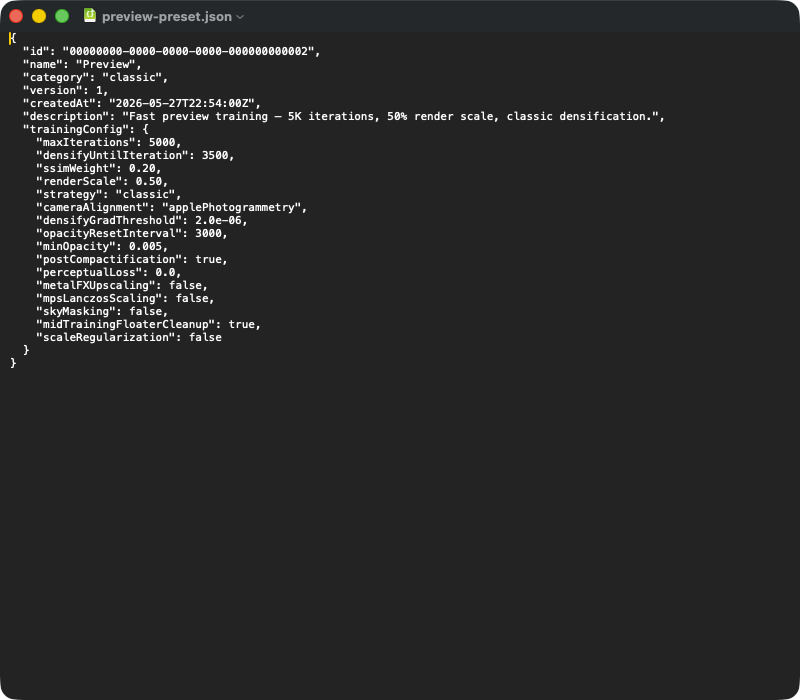
A typical preset JSON export. Top-level fields: id (UUID), name, (classic | mcmc | sceneClass | custom), (schema version), (timestamp), (free text). The nested object holds the parameters that are critical for reproducibility — on import the entire block is deserialized into the TrainingConfig struct, and defaults from the current app version fill in any fields missing from the JSON (e.g. after an app update). To hand a preset over to another Mac, you just ship this JSON file.
The TrainingConfig struct is the heart of every training run in RadianceKit. It collects every parameter that influences training — from maximum iteration count over the eight learning rates to the special fields for MCMC, Mip-Splatting, the curriculum and the scene-aware cap logic. You edit it in the sidebar in the Training Configuration section (Expert View), save it as a preset or hand it over as a JSON export to another Mac. At training start this very object is frozen and handed to the GPU backend.
This chapter is reference material for power users and script authors. It lists all 81 public fields, the 9 static presets and the one public method. The source file is TrainingConfig.swift — when in doubt the doc comment stored there and the initializer default are the source of truth.
Table of contents:
+ Iteration (T1–T2) + Learning Rates (T3–T10) + Densification — Classic (T11–T16) + Loss (T17–T20) + SH Degree Progression (T21) + Performance (T22–T25) + Diagnostics and Point Cloud Preparation (T26–T30) + Regularization (T31–T37) + Refinement (T38–T44) + Sky Dome (T45–T48) + Adam + LR Schedule (T49–T55) + Post-Processing + Apple AI (T56–T60) + MCMC Densification (T61–T73) + Mip-Splatting (Q1.5) (T74–T76) + Adaptive Densification (Q5) (T77–T79) + Curriculum (Q6) (T80–T81) + Static Presets (TP1–TP9) + Method: + Which field for what? (Cheat Sheet) + Dangerous Fields
Iteration (T1–T2)
T1maxIterations
DETAILS
Default: 30 000 (initializer), 35 000 (.full), 200 000 (.fullMCMC) Range: 1 000 – 500 000 (UI slider), no hard upper limit in the logic Defined in:
TECHNICAL
Total number of training iterations the backend runs through. One iteration means a forward render of a single training camera, one backward pass over all loss components (L1 + SSIM + optional regularizations + sky mask) and one Adam optimizer step. This number directly drives the other schedules: position learning rate follows a cosine annealing curve from 0 to either T1 itself or to T49 positionLRScheduleEndIteration; densification stops at T2 densifyUntilIteration; MCMC noise decay ends at T69 mcmcNoiseDecayEnd; SH degree upgrades happen at the three marks in T21. For classic densification the empirically determined sweet spot is at 20 000–35 000 iterations (Sessions 1–32, V546 tests), for MCMC at 60 000–200 000 (V534). Pushing well beyond the values stored in the preset rarely brings additional quality — Adam momentum saturates, and without an LR decay end the loss stagnates. Conversely, going below ~5 000 leads to incompletely converged geometry (density control has too little time to clone/split).
T2densifyUntilIteration
DETAILS
Default: 15 000 (initializer), 5 000 (.full), 160 000 (.fullMCMC) Range: 0 – Defined in:
TECHNICAL
Iteration at which densification stops. Up to this point Gaussians are cloned, split and pruned according to the rules parameterized in T11–T16 (Classic) or T67–T70 (MCMC); after that the Gaussian count stays constant and only positions, rotations, scales, opacities and SH coefficients are optimized (refinement phase). In the 3DGS original paper the value sits at 50 % of T1, in RadianceKit's .full preset at only ~14 % (5 000 of 35 000) — a consequence of the V310/V338 experiments which showed that after 5 000 iterations further densification makes the result worse (more floaters, higher memory use, no quality gain). MCMC, on the other hand, runs relocation up to 80 % of T1 (V504b) because MCMC does not produce harmful floaters. If T2 is chosen too small (< 1 000), too few Gaussians arise; too large under Classic (> 50 % of T1) leads to overgrowth and RGB saturation outliers (see Outdoor Overtraining Findings).
Learning Rates (T3–T10)
T3positionLearningRate
DETAILS
Default: 0.00016 Range: 1e-7 – 1e-3 (recommended) Defined in:
TECHNICAL
Adam learning rate for each Gaussian's XYZ position at the start of training (iteration 0). It follows a cosine annealing curve and decays over training down to T4 positionLearningRateFinal. The default 0.00016 comes from the 3DGS original paper (Kerbl et al.~2023) and in RadianceKit is not to be scaled even with higher image resolution — position moves in world coordinates, not in pixel space. A clear increase (> 0.0005) makes Gaussians jump over long distances and the loss becomes unstable; values well below (< 0.00005) mean badly initialized point clouds never find their place. V414 tested doubling the initial value → 16.8 % worse L1 loss; the V544a tunings confirmed the paper default as optimal. Note: under .fullMCMC we deliberately leave this at the default — MCMC needs constant learning rates for its relocation logic, so tuning here brings nothing.
T4positionLearningRateFinal
DETAILS
Default: 0.0000016 (initializer + paper), 0.000016 (.full, .fullMCMC — 10× higher) Range: 0 – Defined in:
TECHNICAL
End value of the position LR cosine annealing curve. It is reached either at T1 maxIterations or, if set, at T49 positionLRScheduleEndIteration. The RadianceKit .full preset uses 0.000016 — i.e. 10× higher than the paper default 0.0000016. V420 experiments showed that 0.5× of the final value (0.000008) makes loss 6.4 % worse; V414 showed that 2× the initial value makes it 16.8 % worse. The high final value is not a trade-off but a deliberate choice: with too aggressive a decay, Gaussians lose during the refinement phase the ability to react to newly arrived densification candidates. Through the V431/V433 extension the schedule phase can be shortened (T49 < T1), so that T4 is reached before the end of training and the rest of training runs at the constant mini-LR — typical configuration: T49 = 20 000, T1 = 35 000, refinement thus at 0.000016 for 15 000 iterations.
T5shDCLearningRate
DETAILS
Default: 0.0025 (initializer + paper), 0.005 (.full and all MCMC presets — 2×) Range: 0.0001 – 0.05 Defined in:
TECHNICAL
Adam learning rate for the DC component (degree 0, i.e. constant albedo) of the spherical harmonic color. SH-DC corresponds to the direction-independent base tone of a Gaussian, essentially the "base color". V176 and V188 experiments found 2× higher than the paper default to be optimal — faster color convergence, especially because with short training (, 5 000 iterations) the SH-DC otherwise does not converge. Unlike the geometric LRs, SH-DC has no decay; the learning rate stays constant over all iterations (or just follows the optional extended-phase decay from T51). V416 tested a quadrupling to 0.01 → 6.4 % worse loss with beta2=0.99 Adam.
T6shRestLearningRate
DETAILS
Default: 0.000125 (initializer + paper), 0.00025 (.full and MCMC — 2×) Range: 0.000001 – 0.005 Defined in:
TECHNICAL
Adam learning rate for the higher-order SH coefficients (degree 1, 2, 3 — i.e. the view-direction-dependent color components that produce highlights, reflections and soft shading). 20× smaller than T5 per paper convention, because these coefficients grow quadratically in count (3 for degree 1, 5 for degree 2, 7 for degree 3 → 15 floats total per Gaussian) and without a smaller learning rate would oversaturate the image. They are unlocked in two steps — until the first mark in T21 shDegreeUpgradeIterations only degree 0 is active (so only T5), after that 1, then 2, finally 3. Low values here are particularly important on scenes with lots of diffuse lighting; on very glossy surfaces (car paint, water) tuning doesn't help — the SH representation itself is limited.
T7opacityLearningRate
DETAILS
Default: 0.05 (initializer + paper), 0.1 (.full, MCMC — 2×) Range: 0.001 – 1.0 Defined in:
TECHNICAL
Adam learning rate for the logit opacity of each Gaussian. The app stores opacity as an unbounded float value and transforms it with sigmoid into [0, 1]; the LR acts in logit space. The paper default 0.05 was restored after V50 tests (best single-run L1 0.1664), V71 reverted V67's 0.025. The V188 doubling to 0.1 makes pruning more efficient — dead Gaussians fall faster below the T14 pruneOpacityThreshold. V418 showed: 0.05 with beta2=0.99 Adam is 7.1 % worse than 0.1 — the interaction with the Adam configuration is non-trivial. Low values (< 0.01) mean "dead" Gaussians linger forever and waste memory; too-high values (> 0.5) can lead to opacity explosion, which is why the logit value is clamped in the optimizer to [-15, 3] (see the "Opacity Explosion Prevention" note in CLAUDE.md).
T8opacityLearningRateFinal
DETAILS
Default: 0.0 (= "no decay") Range: 0 or 0.001 – Defined in:
TECHNICAL
Optional cosine decay end value for the opacity LR (V427). When 0.0, decay is disabled and the opacity LR stays constant at T7 over the entire training. V427 tested a decay 0.1 → 0.01 — result was 11.5 % worse loss; reverted, hence the default "off". The hypothesis behind the field: in the refinement phase, a constant opacity LR could lead to oscillation, so that splats which had already reached the right level of transparency would be pushed around again by random gradient fluctuations. Empirically this is not the case — the logit clamping logic catches that anyway. The field stays available for future experiments; very long MCMC runs (> 500K iterations) might also benefit from it.
T9scaleLearningRate
DETAILS
Default: 0.005 (initializer + paper), 0.01 (.full, MCMC — 2×) Range: 0.0001 – 0.1 Defined in:
TECHNICAL
Adam learning rate for the three scale components of each Gaussian in log space (RadianceKit stores log(scale) so that scales stay positive). The paper default 0.005, doubled in RadianceKit to 0.01 for better scale convergence with the optimized learning rate configurations. V423 experiment: 0.005 with beta2=0.99 Adam → 18.7 % worse loss and visibly too few Gaussians (density control couldn't clone because scale updates were too sluggish). Scale controls the extent of each Gaussian — too fast learning leads to "needle" Gaussians (extremely long thin splats, see T34 scaleRatioPruneThreshold), too slow learning keeps splats too compact and density control has to split too often.
T10rotationLearningRate
DETAILS
Default: 0.001 (initializer + paper), 0.002 (.full, MCMC — 2×) Range: 0.0001 – 0.05 Defined in:
TECHNICAL
Adam learning rate for the four quaternion components of each Gaussian. The quaternion is re-normalized after each Adam update (L2 norm = 1) — otherwise the covariance matrix would degenerate. RadianceKit doubles the paper default in the Quality presets because rotation has smaller absolute gradient magnitudes than scale/position (on the unit sphere each step stays short) and without 2× rotation would be clearly under-converged in the 35 000 iteration window. V188 documents this. On NeRF-Blender scenes (Lego, Chair) rotation matters particularly — the edges of objects only line up properly after 5 000–10 000 iterations.
Densification — Classic (T11–T16)
T11densifyGradThreshold
DETAILS
Default: 0.000002 (initializer, calibrated for 0.5× resolution), 0.0000011 (.full, calibrated for 1.0×), 0.000004 (.quickTest, calibrated for 0.25×), 2e-7 (.fullClassicPaper) Range: 1e-8 – 1e-3 (resolution-dependent) Defined in:
TECHNICAL
Threshold for the L2 norm of the screen-space projected gradient dMean2D, above which a Gaussian is marked for cloning or splitting. The absolute value depends directly on the training resolution — dMean2D scales roughly as 1/resolution² (more pixels = smaller per-pixel gradients). Hence every T22 trainingRenderScale step needs a calibrated threshold: 0.25× → 4e-6, 0.5× → 2e-6, 1.0× → 5e-8 … 1.1e-6 (.full). The paper default 0.0002 is NDC-normalized and not directly comparable to RadianceKit's world-space pipeline. With the V440-introduced T52 adaptiveDensifyThreshold flag the value can be derived at runtime from the p98 of the current gradient distribution — but V440 tested this on real scenes and produced 63 K Gaussians (catastrophic pruning loss); the flag stays off. Q5 (T77–T79) provides an alternative adaptive logic via rolling median. This field is not harmless — halving creates 2–4× more Gaussians (memory pressure, OOM risk); doubling can under-densify the scene.
T12densifyFromIteration
DETAILS
Default: 500 Range: 100 – 5 000 Defined in:
TECHNICAL
First iteration at which densification becomes active. Before that only "bare" learning on the initial SfM point cloud happens, without new Gaussians being created. The default 500 comes from the 3DGS paper and gives initialization time to stabilize — if densification starts as early as iteration 0, mis-positioned SfM points are cloned many times before they even find their proper place. V349 tested 1000 → slightly worse loss; the default is optimal.
T13densifyInterval
DETAILS
Default: 100 (initializer, MCMC), 200 (.full) Range: 50 – 1 000 Defined in:
TECHNICAL
How many iterations sit between two densification steps. Paper default 100 — every 100 iterations the list of densify candidates is evaluated, cloned/split, and at the same time the list of prune candidates (sigmoid(opacity) < T14 pruneOpacityThreshold) is removed. V112 tests found 200 to be optimal for .full — this relieves the GPU because fewer reorganization passes run, and gives each Gaussian more time to settle after a clone action. V417 tested 100 with beta2=0.99 → 5.8 % worse (957 K Gaussians, over-densification). Under MCMC the same field is interpreted as the relocation interval; see T67 mcmcRelocationInterval for the MCMC-specific logic.
T14pruneOpacityThreshold
DETAILS
Default: 0.005 (initializer, paper, MCMC), 0.001 (.full) Range: 0.0001 – 0.1 Defined in:
TECHNICAL
Sigmoid opacity threshold below which a Gaussian is deleted at the next densification step. Works together with T7 opacityLearningRate and the logit clamp logic in the optimizer. V393 lowered the default from 0.005 to 0.001 in .full — result: splats that only matter under exotic viewing angles are kept longer and contribute to SH detail. V394 tested 0.0001 → slightly worse (too little pruned, memory wasted). Important: density control MUST always prune, even if buffer capacity is already full due to other measures (see "Density Control Must Always Prune" in CLAUDE.md) — otherwise dead Gaussians accumulate and the count freezes.
T15opacityResetInterval
DETAILS
Default: 3 000 (initializer + paper), 100 000 (.full = effectively disabled), 200 000 (.fullMCMC = disabled) Range: 1 000 – 100 000+ Defined in:
TECHNICAL
How many iterations between resetting the opacity of all Gaussians to a low value (~0.01) — a measure from the 3DGS paper to reassess "frozen" splats. V194 showed that with RadianceKit's warmup + stochastic training setup + 2× learning rates, opacity reset costs 5.5 % quality and that logit clamping already covers the reset function. Hence in .full practically disabled (100 000 > 35 000, so never triggered). V421 tested reset every 3 000 with beta2=0.99 → 4.9 % worse; reverted. Under .fullClassicPaper (Q1.5-A, paper-true test) it is deliberately set back to 3 000 — that was one of the levers with which the paper-magnitude Gaussian budgets were to be reached.
T16maxScreenSize
DETAILS
Default: 0.0 (= disabled) Range: 0 (off) or > 0 Defined in:
TECHNICAL
Maximum screen-space size (in projected pixels) a Gaussian may reach before being forcibly split. The value is set to 0 (V48 tested and reverted) — RadianceKit's density control instead uses the world-space scale threshold from the dMean2D logic. Stays in the field catalog because future experiments with Mip-Splatting (T74–T76) or scene-specific splatting strategies could benefit from it. Enabling (value > 0, e.g. 20) would force splats that have grown very large on screen to subdivide — relevant with large smooth wall surfaces where a single giant splat offers too little detail.
Loss (T17–T20)
T17ssimWeight
DETAILS
Default: 0.2 (initializer + paper + .full), 0.05 (all MCMC presets) Range: 0.0 – 1.0 Defined in:
TECHNICAL
Weight of the D-SSIM term in the combined loss function loss = (1 - λ) * L1 + λ * D-SSIM, where λ = T17. The 3DGS paper default 0.2 is optimal for classic densification — V383 tested 0.3 → 28.9 % worse, V373b confirmed 0.2 as the sweet spot. For MCMC it was independently established in V521b/V534: 0.05 is optimal because MCMC, through its stochastic exploration, needs a stronger L1 signal component — higher SSIM weights would dilute the relocation decisions. SSIM is significantly more expensive to compute than L1 (local 11×11 windows over the whole image); RadianceKit uses an MPS-accelerated implementation that stays under 1 ms per 1080p image. Q7 BayesOpt sweeps found scene-specific optima between 0.05 (.outdoorPreset: 0.082) and 0.171 (.indoorPreset).
T18ssimWeightRefinement
DETAILS
Default: 0.0 (= "no switch, keep ssimWeight") Range: 0 or 0 – 1.0 Defined in:
TECHNICAL
Optional SSIM value for the refinement phase after T2 densifyUntilIteration. V428 tested 0.2 → 0.3 in refinement → 16 % worse loss (both L1 and SSIM degraded); reverted, hence default 0.0. The hypothesis behind the field was that after densification — when no more new Gaussians are being created — a stronger SSIM share would maximize structural sharpness. Empirically false: increasing SSIM weight means indirectly lowering L1 weight, and L1 is the much more meaningful signal in the final refinement phase. The field stays available for future experiments with perceptual loss (T60) or edge loss (T19), where a refinement-specific loss composition might make sense.
T19edgeLossWeight
DETAILS
Default: 0.0 (= disabled) Range: 0 or 0.001 – 1.0 Defined in:
TECHNICAL
V437 experimental loss: weight of a Sobel-gradient-domain L1 loss that compares image edges directly (ground-truth Sobel vs render Sobel) on top of L1+SSIM. Hypothesis: edge information is a perceptual cornerstone of image quality and an explicit term should encourage Gaussians to hit edges better. Test results: weight 0.1 → 11 % worse loss, 0.01 → quality-neutral but 10 % slower. The Sobel pass costs an extra MPS forward on ground truth and render. Hence permanently disabled. Future use case: scenes with hard artificial edges (architecture, furniture, renderings) could benefit — Q7 scene class presets didn't pick it though, instead they scaled the SSIM weight.
T20skyMaskingEnabled
DETAILS
Default: false (initializer and all presets) Range: boolean Defined in:
TECHNICAL
Enables sky masking. In every image the sky region is masked out via Apple Vision Framework (VNGenerateForegroundInstanceMaskRequest), and the loss in this region is set to zero. Reason: outdoor scenes often suffer from blue/gray/white sky pixels driving the app to place Gaussians exactly there — which is perceived as "floaters". Without a sky mask the loss in this region would never be zero because the sky in the image varies slightly and the app keeps trying to rebuild it with splats. The Vision mask is computed once per camera before training and held in RAM. Typically activated together with T45 skyDomeEnabled (UI logic in the Settings view). Leave disabled for indoor scenes or synthetic renderings — the mask would erroneously detect ceilings or walls as "sky".
SH Degree Progression (T21)
T21shDegreeUpgradeIterations
DETAILS
Default: [1_000, 2_000, 3_000] (initializer), [2_000, 5_000, 8_000] (.full, MCMC), [1_000, 2_000] (.preview — degree 3 skipped) Range: [Int], each value in [0, maxIterations], monotonically increasing Defined in:
TECHNICAL
Iterations at which the active SH degree is upgraded 0→1, 1→2, 2→3. Before the first mark only the DC components are active (i.e. T5 shDCLearningRate), after the first mark DC + 3 degree-1 coefficients, after the second mark + 5 degree-2 coefficients, after the third mark all 15 coefficients. Memory consumption per Gaussian grows in steps accordingly — 4 floats → 16 floats → 36 floats → 64 floats. The Quality presets delay the upgrades compared to initializer defaults (V228) because the geometry should stabilize first, before the color details with their higher frequency are added on top. V384 tested [1K, 2K, 3K] for .full → 9.3 % worse — confirms the delay. .preview caps at degree 2, because degree 3 doesn't converge in 5 000 iterations and just consumes optimizer capacity. Q6 (T80–T81) offers an alternative curriculum logic that dynamically overrides this list.
Performance (T22–T25)
T22trainingRenderScale
DETAILS
Default: 1.0 (initializer, .full, MCMC, Scene-Class), 0.5 (.preview), 0.25 (.quickTest) Range: 0.05 – 2.0 (typically 0.25, 0.5, 1.0) Defined in:
TECHNICAL
Rendering resolution during training relative to the original resolution of the training images. At 0.5 every image is downscaled to 50 % width × 50 % height (i.e. 25 % of the pixels) and the Gaussian rendering happens at this lower resolution. Reduces both memory and compute quadratically. Important: T11 densifyGradThreshold has to match the chosen resolution — the gradient magnitudes scale with 1/resolution², which is why .quickTest (0.25×) has a much higher threshold (4e-6) than .full (1.0×, 1.1e-6). RadianceKit warns at very large images and adjusts automatically — 3 MP target resolution. With extreme 4K input images, 0.5 or even 0.25 would make sense, otherwise any Mac will run only in CPU compaction.
T23resolutionWarmupScale
DETAILS
Default: 0.0 (= disabled) Range: 0 or 0.1 – Defined in:
TECHNICAL
V133 optimization: train the densification phase (iter 0 to T2) at a lower resolution than the refinement phase. V308 turned it off again for .full because with T22 = 1.0 and cosine annealing, the time win was marginal and quality suffered slightly. Stays in the field catalog because it could become useful again with 4K inputs and long training runs — Q6 curriculum (T80) picked up a similar logic, though there it is tied to the LR schedule. If enabled and T80 curriculumResolutionRamp is also true, Q6 wins and overrides this value.
T24tileSize
DETAILS
Default: 16 Range: 8, 16, 32 Defined in:
TECHNICAL
Size of the rasterization tiles in pixels. The Gaussian Splatting rendering is tile-based: the image is divided into 16×16 pixel tiles, each tile collects the Gaussians relevant to it, sorts them by depth and blends them. 16 is the standard used by practically all 3DGS implementations and is hard-coded in RadianceKit's Metal kernels; changing this value would require shader recompilation and is not effective in the current state. Stays as a field in case a future engine version supports dynamic tile size.
T25throttleDelayMs
DETAILS
Default: 0 (initializer, .full, MCMC, Scene-Class), 0 (.preview) Range: 0 – 100 Defined in:
TECHNICAL
Artificial delay between training iterations in milliseconds. 0 = full speed (default). Higher values make the Mac more "usable" during training, by giving GPU/CPU regular breathers — the responsiveness of other apps improves, but training time grows linearly with the delay. Typical values: 1–2 ms ("light" throttling, +5 % training time, Mac feels more responsive), 5 ms ("medium", +15 % training time), 10+ ms ("eco", potentially double the training time). Offered in the Inspector under "Performance" but not in the default view — see backlog dev_ux-backlog.md which suggests removing it from the Expert View because misunderstood it dramatically extends training time.
Diagnostics and Point Cloud Preparation (T26–T30)
T26depthDistortionWeight
DETAILS
Default: 0.0 (= disabled) Range: 0 or 0.0001 – 0.05 Defined in:
TECHNICAL
V366 experimental: weight of a depth distortion regularization loss. Penalizes Gaussians that, along a render ray, are stacked in depth but conceptually belong to the same surface — this encourages concentrated depth distributions and reduces floaters. Tests: 0.01 → 4.5 % worse, 0.001 → 8.1 % worse. The theoretical advantage — improving multi-view consistency — does not show up in the L1 loss, because the hypothesis implicitly assumes that the SfM geometry is correct and the Gaussians just need to be "stacked". In practice the SfM point cloud is usually the weakest component, not the stacking. Stays available for multi-view datasets with particularly clean poses (synthetic, Mip-NeRF 360 with ground truth).
T27singleViewOverfit
DETAILS
Default: false Range: boolean Defined in:
TECHNICAL
Diagnostic flag: when true, every training iteration must use camera index 0 instead of a random one from the camera pool. Reason: if the model can't even overfit a single view (i.e. the loss on view 0 doesn't go to zero even after 10 000 iterations), there's a fundamental bug in the forward/backward pass. This switch was used intensively during the development of the Metal shaders and the differentiable rasterizer kernels — V42–V47 phase. Today only available as a sanity check if someone has modified backend code and wants to do a regression test. Via CLI with –single-view.
T28maxCameras
DETAILS
Default: 0 (= "use all cameras") Range: 0 or 1 – N Defined in:
TECHNICAL
Diagnostic limit from V43: train only with the first N cameras, ignore all further ones. Original reason: test the hypothesis that too many cameras create gradient conflicts (too many conflicting loss signals for the same Gaussian). Test result: no systematic advantage from artificial limiting — more frames practically always bring more quality. Stays as a CLI flag (–max-cameras N) for targeted experiments, e.g. "does training work on the first 100 images of a 1 500-image drone flight?" Not exposed in the UI.
T29maxInitialPoints
DETAILS
Default: 0 (= "use all SfM points") Range: 0 or 1 000 – 200 000+ Defined in:
TECHNICAL
V54 safety net: limits the number of initial SfM points the training starts with. Dense COLMAP reconstructions can produce > 60 000 points, which with large initial scales leads to 200–300 Gaussians per pixel overlap — this creates a "fog field" in which training does not converge. Subsampling to ~16 000 points (hard-cap logic in the training engine) brings initial density to the level used by reference 3DGS, and dramatically reduces overlap. Set automatically with very dense SfMs; via CLI with –max-points N.
T30cameraClusterOutlierMultiplier
DETAILS
Default: 10.0 (all presets — never overridden) Range: 1.0 – 100.0 Defined in:
TECHNICAL
Multiplier for the camera cluster outlier filter, introduced in Phase 3.10 A.1. Before training the training engine computes the centroid of all camera positions and the maximum distance of any camera from the centroid. SfM points whose distance from the centroid exceeds multiplier × maxCameraDistance are discarded as outliers. Default 10× preserves the pre-Phase 3.10 behavior. A subtle bug: tighter SfM (cameras closer together) → smaller → smaller threshold → more points are discarded as outliers. Looser SfM → larger threshold → fewer points discarded. This is one of the causes of the Phase 3.9 funnel-vs-training anti-correlation: better SfM can downstream lead to worse training because too many initial points are killed. The field is available as a CLI override (–camera-cluster-outlier-multiplier) for the A.3 sweeps; not exposed in the UI. Values below 5 are usually too restrictive, above 20 ineffective.
Regularization (T31–T37)
T31coarseToFineBlurRadius
DETAILS
Default: 0 (= disabled) Range: 0 or 1 – 10 Defined in:
TECHNICAL
V369 experimental: box blur radius applied at the start of the densification phase to the ground truth image, reduced linearly to 0 by the end of densification (T2). Hypothesis: coarse-to-fine training — first learn coarse structures, then details — should yield more stable geometry. Tests: r=3 → 9.6 % worse, r=1 → 5.1 % worse. Reason for failure: densification decides based on image domain gradients, and blurring reduces exactly the signals important for "must clone here". Stays in the field catalog for future tests with a different density control scheme.
T32scaleRegWeight
DETAILS
Default: 0.0 (= disabled) Range: 0 or 0.0001 – 0.05 Defined in:
TECHNICAL
V370 experimental: L1 regularization on world-space scale. Penalizes Gaussians that grow too large — prevents "mega splats" covering whole wall surfaces with a single Gaussian. Tests: 0.01 → 200 % worse loss (2 M Gaussians, total explosion), 0.001 → 214 % worse. Reason: scale regularization conflicts with density control — smaller scales mean more Gaussians are needed, so density control splits more often, which in turn means more gradient work. Disabled, but documented for Mip-Splatting experiments (T74): in that context a scale lower bound could make sense.
T33anisotropyRegWeight
DETAILS
Default: 0.0 (= disabled) Range: 0 or 0.0001 – 0.05 Defined in:
TECHNICAL
V445 experimental: penalty on the max(scale)/min(scale) ratio, intended to prevent extremely elongated "needle" Gaussians perceived as floaters. Tests: 0.01 → 69 % worse, 0.001 → 15 % worse. Reason: regularization forces splats toward "round" shape, which on a flat surface (wall, table, floor) is exactly wrong — there a flat, broad Gaussian is more efficient than a spherical one. Disabled. V549f offered with T34 scaleRatioPruneThreshold an alternative more targeted approach, which was also reverted.
T34scaleRatioPruneThreshold
DETAILS
Default: 0.0 (= disabled) Range: 0 or 5.0 – 100.0 (typically 10.0 – 30.0) Defined in:
TECHNICAL
Experimental post-training pruning that deletes each Gaussian whose max(scale)/min(scale) ratio exceeds the linear threshold set here. Targets extremely elongated "needle/disc" floaters that can't be eliminated by regularization alone. In tests the pruning removed floaters as hoped, but also useful flat splats on walls and floors — the image became hole-ier. Hence off by default; the CLI flag (–scale-ratio-prune N) remains for targeted experiments. Recommended values if you do want to test: 30 (very conservative, removes only extreme outliers), 10 (aggressive, costs detail).
T35opacityRegWeight
DETAILS
Default: 0.0 (= disabled) Range: 0 or 0.0001 – 0.05 Defined in:
TECHNICAL
V446 experimental: binary cross-entropy penalty that pulls opacity toward 0 or 1 (i.e. away from "semi-transparent"). Hypothesis: sharper opacity distribution would improve image clarity. Tested combined with T33 → regularization costs quality, both disabled. Disabled. Attention: in 1.4.3 beta a bug appeared that had exactly this field with a changed default value (initializer = 0.01), which led to mass extinction of the Gaussian count (460 K → 5 in one iteration). Since 1.4.4 hard-pinned to 0.0 as default.
T36opacityDecayFactor
DETAILS
Default: 0.0 (initializer = disabled), 0.9995 (.full, .classicBalanced — HTGS standard) Range: 0 (off) or 0.95 – 1.0 Defined in:
TECHNICAL
V546 implementation of the HTGS scheme (Hierarchical Time-Gating, Eurographics 2025): every T37 opacityDecayInterval iterations the sigmoid opacity of each Gaussian is multiplied by this factor. 0.9995 × 100 applications gives ~95 % residual per densification phase — a slight but steady downward pressure on all opacities, which reliably drops weakly contributing Gaussians below the T14 pruneOpacityThreshold. The result: 14 % better L1 loss on Horse Full (3-trial avg V546) vs V438 without decay. Active only during the densification phase (until T2), after that training continues without decay so the opacities established during refinement stay stable. Not used under MCMC (MCMC has its own mechanisms via T67 mcmcRelocationInterval + T68 mcmcDeadOpacityThreshold).
T37opacityDecayInterval
DETAILS
Default: 50 Range: 10 – 500 Defined in:
TECHNICAL
Iteration interval at which T36 opacityDecayFactor is applied. HTGS paper default 50, left at that in .full. Long intervals (>200) partially cancel the effect because between two applications enough gradient updates happen that opacity rises again. Shorter intervals (<20) make decay too aggressive. Active only in the densification phase.
Refinement (T38–T44)
T38gradientAccumulationSteps
DETAILS
Default: 1 (= "one view per Adam step") Range: 1 – 8 Defined in:
TECHNICAL
V424 feature: number of views whose gradients are accumulated before an Adam update runs. With > 1 the app runs on a separate "unfused" backward project path that sums the gradients into a separate buffer; the final application scales by 1/N to keep magnitude constant. V424 tested 2-view → quality-neutral but 10 % slower (because unfused is more expensive than fused). Reverted for .full but deliberately used for MCMC — .fullMCMC runs with, but V544a tests showed that with the quality gap to Classic shrinks to 5 % (instead of 11 %). In the initializer default 1, in the current preset 1, remains a CLI flag (–accum-steps N).
T39testViewIndices
DETAILS
Default: [] (= empty, all views are used for training) Range: Set<Int>, arbitrary subset of camera indices Defined in:
TECHNICAL
V546 feature: set of camera indices that are NOT used for training but saved as holdout for PSNR/SSIM/LPIPS evaluation. Set automatically when the –benchmark CLI flag is active: then every 8th view starting from index 0 (LLFF standard, identical to Mip-NeRF 360 and 3DGS paper conventions). Without benchmark empty — training uses all views. Caution: manually setting this field without understanding the indices can make the benchmark unusable (e.g. when all indices are set above N while there are only N-50 views → no holdouts → no evaluation). When you export your own preset, testViewIndices is not persisted because it is scene-dependent and would otherwise leave nonsensical values between different datasets.
T40refinementPruneInterval
DETAILS
Default: 0 (= disabled) Range: 0 or 100 – 5 000 Defined in:
TECHNICAL
V425 feature: every N iterations during the refinement phase (after T2) an additional prune pass runs that removes Gaussians with sigmoid(opacity) < T41 refinementPruneOpacityThreshold. Reason: during densification there are regular density control calls, after that not anymore — but Gaussians whose opacity continues to drop stay in the buffer. V425 tested and reverted: the additional pruning correlated with V426 (Two-Phase Densification, which also ended in 0-Gaussians cascade failure). Disabled. CLI flag available for experiments; if enabled, 1 000 or 2 000 are sensible values.
T41refinementPruneOpacityThreshold
DETAILS
Default: 0.0 (= "use T14") Range: 0 or 0.001 – 0.1 Defined in:
TECHNICAL
V425b: separate opacity threshold for refinement pruning. After densification most Gaussians have reached a clearly higher opacity (> 0.001), so the default T14 pruneOpacityThreshold would be too lax. If T40 is active, this field determines its own threshold. At 0.0 T14 is used as before. Only relevant if T40 > 0.
T42midTrainingCompactificationIterations
DETAILS
Default: [] (= disabled) Range: [Int], values in (densifyUntilIteration, maxIterations) Defined in:
TECHNICAL
V549 feature: explicit iteration points during the refinement phase at which a compactification pass runs (removes sigmoid(opacity) < 0.01 + outlier-scale Gaussians, same logic as T56 postTrainingCompactification). Reason: long refinement phases can show confetti/floater accumulation, whose SH then overfits to view-specific artifacts. Typical configuration if enabled: [10000, 20000, 30000] for 40K Classic. BUT: V549 A/B tests on the Family dataset showed worse L1 in all configurations: [10K,20K,30K]@0.01 → −48 % count but +36 % L1; [20K,30K]@0.005 → −44 % count but +45 % L1; [20K,30K]@0.001 → −17 % count but +87 % L1. Hence disabled. CLI flag –mid-compact "10000,20000" available, if you prefer the visual floater tradeoff (less confetti in the viewport) over the loss regression.
T43frustumCullEnabled
DETAILS
Default: false Range: boolean Defined in:
TECHNICAL
V549b feature: after training all Gaussians outside the union of all training camera frusta are removed. Such Gaussians were never constrained by the loss signal and are always floaters. Particularly effective for scenes where the novel view sits behind or beside the camera path (e.g. behind a linear drone flight) — the floaters there are never visible during training but very much so later when moving in the 3D viewer. V549b A/B on drone flights showed positive results, hence available as opt-in. Default false because for object captures with full orbit coverage the frustum union encompasses the whole scene and the feature removes nothing — offered in Settings under "Floater Reduction" and also implicitly tested in Q9 Outdoor preset via T44 frustumCullExpansion (Q7 BayesOpt didn't enable it though, because outdoor sky dome solves the same problem better).
T44frustumCullExpansion
DETAILS
Default: 1.1 Range: 1.0 – 2.0 Defined in:
TECHNICAL
NDC margin for T43 frustumCullEnabled. 1.0 would cut exactly at the image edge, which would trim wobbly splats near the edge too aggressively. 1.1 = 10 % padding beyond the exact camera framing — gives some tolerance for edge pixels that might still become visible in a slightly shifted novel view. Values > 1.2 make the cull practically ineffective because the expanded frustum encompasses too much space.
Sky Dome (T45–T48)
T45skyDomeEnabled
DETAILS
Default: false (initializer + all presets except P9 Outdoor) Range: boolean Defined in:
TECHNICAL
V549e feature: before training starts a spherical point cloud is generated (Fibonacci sphere with T46 sample points), placed at a radius of T47 skyDomeRadiusMultiplier × scene_extent around the scene center, and initialized with the colors from sky-masked pixels of all training cameras (see T20 skyMaskingEnabled). These sky dome Gaussians are inserted at the beginning of the Gaussian buffer and during training "frozen" (position/scale/rotation gradients = 0, only SH and opacity remain optimizable). Effect: instead of black "confetti" areas in the distance, the user sees a real sky in novel views. The V549e MVP works very well on drone and landscape scenes; in P9 Outdoor preset default-on. Leave off for indoor scenes — the sphere would dangle uselessly outside the room.
T46skyDomeSampleCount
DETAILS
Default: 5 000 Range: 1 000 – 50 000 (typical 2 000 – 10 000) Defined in:
TECHNICAL
Number of Fibonacci sphere sample points on the sky dome sphere. Higher values → denser sky dome (better at large resolutions and lots of visible sky), but higher memory consumption. 5 000 is the sweet spot for 4K renderings; at lower resolutions 2 000–3 000 suffice. The points are initialized by cosine distance to each training camera view vector with the corresponding sky-masked pixels — sample points whose view cone is seen by no camera keep a low opacity initial value, but stay unchanged during training (frozen).
T47skyDomeRadiusMultiplier
DETAILS
Default: 30.0 (initializer + most presets), 59.0 (P9 Outdoor, Q7 BayesOpt optimum) Range: 5.0 – 200.0 Defined in:
TECHNICAL
Radius of the sky dome sphere relative to the scene extent (= mean distance between camera positions). 30 = the sphere has 30× the diameter of the camera cloud. Too small (< 5) → sky dome interferes with the scene itself (e.g. a sky dome splat lands in the foreground); too large (> 100) → float32 precision loss at the sky dome positions, which triggers render glitches in the distance. Q7 BayesOpt on Bicycle (Mip-NeRF 360) found 59.0 as scene-specific optimum for outdoor — this suggests that the default 30.0 is too small for deep landscapes and that sky dome pixels visibly render as a "wall" in image-edge regions.
T48frozenGaussianCount
DETAILS
Default: 0 (= no frozen Gaussians) Range: 0 or 1 – T46 Defined in:
TECHNICAL
Number of Gaussians at the start of the buffer whose position/scale/rotation gradients are zeroed in the optimizer — they remain spatially rigid over the entire training. Density control may not clone, split or prune them. Used for sky dome injection (see T45): when sky dome is on, this field is automatically set to T46 skyDomeSampleCount. Manual setting is possible (e.g. to freeze a pre-placed point cloud from a LiDAR scan), but not directly accessible in the UI. Important: the first N Gaussians in the buffer are always the frozen ones — the order in the buffer decides, not an explicit index.
Adam + LR Schedule (T49–T55)
T49adamResetIteration
DETAILS
Default: 0 (= disabled) Range: 0 or 100 – Defined in:
TECHNICAL
V430 feature: iteration at which the Adam optimizer momentum accumulators (m1, m2) are reset to zero. Bias correction afterwards runs with (iter - adamResetIteration) instead of iter. V430 tested reset at 5 000 (after densification end) → 12.8 % worse loss. Reason: the Adam momentum that built up during densification carries information about the typical gradient magnitudes and accelerates the refinement phase. Throwing it away costs the first ~500 iterations of refinement in convergence. Disabled. Stays as CLI flag for research experiments.
T50positionLRScheduleEndIteration
DETAILS
Default: 0 (initializer = "use maxIterations"), 20 000 (.full — cosine ends at 20K although maxIter=35K), 30 000 (.fullClassicPaper) Range: 0 or 1 000 – Defined in:
TECHNICAL
V431 feature: iteration at which the cosine annealing curve for position LR reaches its minimum. If 0, this is identical to T1 maxIterations. If > 0, the schedule runs up to this value and stays constant at T4 positionLearningRateFinal afterwards. This allows an "extended refinement phase" with minimal but constant learning rate — refines positions slowly without a new decay. .full does this (schedule ends at 20K, training runs to 35K), V434c/V434d confirmed: 15K and 25K both about the same, 20K marginally optimal. Used together with T51 to also modify the non-position LRs in the extended phase.
T51extendedPhaseLRDecay
DETAILS
Default: 0.0 (= disabled, constant LRs) Range: 0 or 0.01 – 1.0 Defined in:
TECHNICAL
V433 feature: minimal multiplier for the non-position LRs (scale, rotation, opacity, SH) in the "extended phase" — i.e. after T50 is reached and position LR is already at T4. If 0.1, scale/rotation/opacity/SH are themselves cosine-decayed from 1.0 (= their standard LR) to 0.1× of their standard. If 0.0 (default), they stay constant. V457 tested full decay (0.0, i.e. decay to zero) against no decay and found: avg 0.0400 (2 runs), the same loss as V438 without decay. Behavior cleaner with decay but not measurably better. Hence disabled. Stays in the CLI as –nonpos-lr-scale F.
T52adaptiveDensifyThreshold
DETAILS
Default: false Range: boolean Defined in:
TECHNICAL
V440 experimental: when true, the app computes each densification step the p98 of the current gradient distribution and uses it as dynamic threshold (clamped to at least 0.5× of the configured value from T11 so it doesn't drift too far). Hypothesis: automatic adaptation to the current scene phase would make density control more robust — e.g. stricter pruning at the start, laxer later, or vice versa. V440 tested and reverted: catastrophic drop to 63 K Gaussians (mass pruning, because the p98 in the first iterations is extremely high and afterwards almost nothing exceeds the threshold). The fixed threshold is already well calibrated, dynamic adjustment hurts more than it helps. Q5 (T77) offers an alternative adaptive logic via rolling median that avoids the problem.
T53mergeAfterDensification
DETAILS
Default: false (initializer), true (.full, .classicBalanced, .fullClassicPaper) Range: boolean Defined in:
TECHNICAL
V438 feature: at the end of the densification phase (iter T2) a one-time merge pass runs that combines nearby Gaussians with similar scale and color. Reduces the Gaussian count by typically 5–15 % without visible quality loss. Reason: after intense cloning, clusters of nearly identical Gaussians arise that contribute nothing new — merging frees optimizer capacity for other areas. Default in Classic Quality presets. Not used under MCMC, because MCMC through its relocation logic doesn't let such clusters form in the first place.
T54densifyPhase2FromIteration
DETAILS
Default: 0 (= disabled) Range: 0 or T2 – T1 Defined in:
TECHNICAL
V426 experimental: enables a second densification phase that starts after the refinement pause at this iteration and runs until T55. Hypothesis: after a refinement phase the gradient accumulators have more stable magnitudes and can more precisely indicate which regions still need additional Gaussians. V426 tested and reverted: two-phase densification fell into 0-Gaussians cascade failure (combined with V425 refinement pruning it destroyed the buffer). Disabled. CLI flag available for experiments.
T55densifyPhase2UntilIteration
DETAILS
Default: 0 Range: 0 or T54 – T1 Defined in:
TECHNICAL
End of V426 two-phase densification. Only relevant when T54 > 0. Both fields together disabled.
Post-Processing + Apple AI (T56–T60)
T56postTrainingCompactification
DETAILS
Default: true (in all production presets), false (.quickTest, .preview) Range: boolean Defined in:
TECHNICAL
V443 feature: after training ends, Gaussians with sigmoid(opacity) < 0.01 are hard-removed (they practically don't contribute to the image anymore). Reduces Gaussian count by typically 58 % and export file size by 55 % without visible quality loss. On by default in production presets — the end result should ship as compact as possible. Off in .quickTest, because a diagnostic run isn't exported anyway. Unlike T42 midTrainingCompactificationIterations (V549) the compactification only happens at the end — refinement can use all Gaussians until then.
T57metalFXUpscaling
DETAILS
Default: false Range: boolean Defined in:
TECHNICAL
V444 feature: enables Apple's MetalFX Spatial Upscaler instead of bilinear interpolation in the 3D viewer output. When training resolution < viewport size (e.g. training at 0.5×, viewport display at full resolution), MetalFX can deliver a clearly sharper image. Changes live in the viewport, no retraining required. Mutually exclusive with T58 mpsLanczosScaling — MetalFX takes precedence. Recommendation: enable when the image in the viewer looks "washed out" compared to expected detail.
T58mpsLanczosScaling
DETAILS
Default: false Range: boolean Defined in:
TECHNICAL
V444 feature: MPSImageLanczosScale for viewport scaling instead of bilinear interpolation. Lanczos is a classic Sinc-based resampling method that delivers significantly sharper results than bilinear with minimal overhead. Live toggle. Overridden by T57 when both are on.
T59livePreviewInterval
DETAILS
Default: 50 (initializer and most presets) Range: 0 (off) or 10 – 5 000 Defined in:
TECHNICAL
How often during training the 3D viewer is refreshed with the current Gaussians. 50 = every 50 iterations a new render in the viewer — enough to observe progress without slowing training. 0 = viewer is not updated at all (background training, max speed). Typical adjustment: under .quickTest drop to 10 (you want to see every step), on long MCMC runs raise to 500–2000 (update overhead in sum noticeable).
T60perceptualLossWeight
DETAILS
Default: 0.0 (= disabled) Range: 0 or 0.001 – 0.5 Defined in:
TECHNICAL
V444 future feature: weight of a perceptual loss term via MPSGraph (VGG-like small network). Would capture structural and textural similarity at a higher semantic level than L1+SSIM — typical in research pipelines where "pixel-perfect" matters less than "looks realistic". Implementation pending (code stub present, but forward pass not implemented). Default 0.0. Stays in the field catalog for future activation; CLI flag –percep-weight F reserved.
MCMC Densification (T61–T73)
T61densificationStrategy
DETAILS
Default: .classic (initializer + Classic presets), .mcmc (all MCMC presets + Scene-Class) Range: .classic or .mcmc Defined in:
TECHNICAL
Chooses between classic densification (clone/split/prune, Kerbl et al.~2023) and MCMC densification (Stochastic Gradient Langevin Dynamics with relocation, Kheradmand et al.~NeurIPS 2024). With .classic T11–T16 is evaluated, with .mcmc the T62–T73. Beware when switching: Classic defaults and MCMC defaults are completely differently calibrated — whoever flips the picker in the Expert View without loading a matching preset risks 1.4.3-bug-style mass extinction (460 K → 5 in one iteration, because MCMC opacity reg at 0.01 kills the Classic opacities). Hence the MCMC initializer defaults are deliberately "soft-washed" (all reg values 0.0).
T62mcmcMaxGaussians
DETAILS
Default: 150 000 (initializer + .fullMCMC + .mcmcBalanced), 100 000 (.mcmcPreview), 1 500 000 (.fullMCMCMip — Mip-Splatting variant with 10× budget), 1.19 M (.renderPreset), 1.25 M (.outdoorPreset), 670 K (.indoorPreset) Range: 0 (= "use buffer capacity") or 10 000 – 5 000 000 Defined in:
TECHNICAL
Hard upper bound for the number of Gaussians under MCMC strategy. The count grows gradually by T70 mcmcGrowthRate (typically 5 %) per relocation step up to this cap. V473/V531 found 150 K as sweet spot — above 200 K dilutes splat quality (too many small redundant Gaussians), below 100 K leaves the scene under-densified. With very large scenes (e.g. 1 545-photo drone flight with 158 K SfM init), 150 K is too low — hence the 1.4.5 extension T72 mcmcCapMultiplier + T73 mcmcAutoScaleByScene. Q7 BayesOpt found scene-specific optima between 670 K (Indoor) and 1.25 M (Outdoor). With value 0 the engine uses the full buffer capacity as cap.
T63mcmcNoiseScale
DETAILS
Default: 0.00005 (5e-5 = paper default) Range: 1e-6 – 1e-3 Defined in:
TECHNICAL
Multiplier for the Gaussian noise that in each MCMC iteration is added to the position of each Gaussian (SGLD logic). Higher = more exploration (Gaussians wander more, finding potentially better spots), lower = more exploitation (Gaussians stay where they're already good). V467 and V536 confirmed 5e-5 as optimal — 1e-5/2e-5 too little exploration, 1e-4 too much (splats diffuse). Cosine-decayed over training time until T69 mcmcNoiseDecayEnd — at the end of the decay range noise is effectively 0 and the Gaussians converge.
T64mcmcOpacityRegWeight
DETAILS
Default: 0.0 (= disabled in RadianceKit defaults, paper: 0.01) Range: 0 or 0.001 – 0.05 Defined in:
TECHNICAL
MCMC-specific L1 penalty on opacity. Paper default 0.01 (pushes unused Gaussians toward zero, makes them available for relocation). V464b showed however: without reg it's measurably better in RadianceKit (Session 28 confirmed). Reason: the pruning criterion defined with T68 mcmcDeadOpacityThreshold is enough on its own — an additional L1 penalty also forces valuable low-opacity Gaussians to die. Hence default 0. Caution: in the 1.4.3 beta build the initializer default was mistakenly 0.01, which resulted in the mass extinction bug (see T61 explanation); since 1.4.4 fixed at 0.0.
T65mcmcScaleRegWeight
DETAILS
Default: 0.0 (= disabled, paper: 0.01) Range: 0 or 0.001 – 0.05 Defined in:
TECHNICAL
MCMC-specific L1 penalty on the scale eigenvalues. Paper default 0.01. V464b: without reg better, same reasoning as T64. Disabled in all RadianceKit MCMC presets. Caution as with T64: 1.4.3 bug.
T66mcmcRelocationInterval
DETAILS
Default: 100 (initializer + all MCMC presets, paper standard), 155 (P9 Outdoor — Q7 BayesOpt optimum) Range: 50 – 500 Defined in:
TECHNICAL
Iteration interval at which MCMC relocates dead Gaussians (sigmoid(opacity) < T68 mcmcDeadOpacityThreshold) to new positions. V537 tested 50 (too disruptive, loss fluctuates) and 200 (marginally worse, MCMC loses responsiveness). 100 is optimal. Q7 BayesOpt on Bicycle found 155 as scene-specific optimum for outdoor — the slightly longer intervals give Adam more time to integrate newly placed Gaussians before the next reloc event puts them under pressure.
T67mcmcWarmupIterations
DETAILS
Default: 500 Range: 100 – 5 000 Defined in:
TECHNICAL
Number of initial iterations during which no MCMC relocation happens. Only after this warmup does the reloc logic kick in. Reason: in the first iterations the opacity values have not yet stabilized — if reloc started directly, Gaussians would be placed at the wrong spots and have to be moved again right away, which would destroy Adam momentum. Paper default 500. RadianceKit adopts this value because V464b showed it is robust.
T68mcmcDeadOpacityThreshold
DETAILS
Default: 0.005 (initializer, paper standard), 0.01 (.fullMCMC and all MCMC presets — V535 optimum) Range: 0.001 – 0.05 Defined in:
TECHNICAL
sigmoid(opacity) threshold below which a Gaussian counts as "dead" and is eligible for relocation. V535 found 0.01 as optimal (0.005 marginal, 0.02 worse). Higher = more aggressive reloc (more Gaussians moved), lower = more cautious. 0.01 corresponds to roughly "0.5 % visual visibility". P10 Indoor uses 0.0142 as optimum via Q7 BayesOpt.
T69mcmcNoiseDecayEnd
DETAILS
Default: 0 (initializer = "no decay"), 160 000 (.fullMCMC = 80 % of 200K), 96 000 (.mcmcBalanced = 80 % of 120K), 40 000 (.mcmcPreview) Range: 0 or 1 000 – Defined in:
TECHNICAL
Iteration at which the T63 mcmcNoiseScale noise is fully damped to zero (cosine decay from iter 0 to here). V497c/V502 found 80 % of maxIterations optimal — gives MCMC enough exploration time but leaves the last 20 % to convergence without noise. 0 = constant noise over all iterations (rarely sensible, MCMC can't converge then).
T70mcmcGrowthRate
DETAILS
Default: 0.05 (paper standard = 5 %) Range: 0.01 – 0.2 Defined in:
TECHNICAL
Growth rate of the MCMC population target per relocation step. The logic: at each reloc event the target population size is multiplied by (1 + growthRate), until T62 mcmcMaxGaussians (or the variant scaled via T72/T73) is reached. V512/V522 found 0.05 as optimal — higher values lead to too-fast growth (Gaussians are inserted before Adam momentum can integrate them), lower values to under-densified scenes at the end.
T71mcmcSigmoidK
DETAILS
Default: 100.0 Range: 10.0 – 500.0 Defined in:
TECHNICAL
Sigmoid sharpness parameter for the MCMC noise attenuation. In the SGLD step the per-Gaussian noise is damped by — high-opacity Gaussians (whose logit is positive) get exponentially less noise than low-opacity ones. K = 100 is sharp, meaning the transition from "full noise" to "no noise" happens very quickly around opacity 0.5. V484–V487 found K = 100 optimal — smaller values (10–50) also let high-opacity Gaussians wobble (destroys converged Gaussians), larger ones (> 500) make the transition artificially hard and dead Gaussians don't get moved at all anymore.
T72mcmcCapMultiplier
DETAILS
Default: 3.0 (initializer + .fullMCMC), 2.0 (.mcmcPreview), 2.5 (.mcmcBalanced), 2.98 (P8 Render), 5.32 (P9 Outdoor), 1.76 (P10 Indoor) Range: 0 (= disabled) or 1.0 – 10.0 Defined in:
TECHNICAL
1.4.5 feature: scene-adaptive cap scaling. When T73 mcmcAutoScaleByScene is true, the effective cap is computed as (clamped to buffer capacity). Background: with large scenes (e.g. 1 545-photo drone flight → 158 K SfM init) T62 = 150 000 is too low — density control couldn't grow at all. With multiplier 3.0 the cap is scaled to 474 K in this example (158 K × 3.0). Q7 BayesOpt found scene-specific optima: outdoor benefits from a high multiplier (5.32 → ~830 K cap with 156 K bicycle init), indoor is happy with 1.76 (walls saturate faster). For the complete resolution of the cap see the method.
T73mcmcAutoScaleByScene
DETAILS
Default: true (initializer + all MCMC presets) Range: boolean Defined in:
TECHNICAL
1.4.5 feature: master switch for the scene-aware cap logic (see T72 +). When false, only T62 mcmcMaxGaussians is used as cap (back to 1.4.4 behavior). On by default because the mass extinction problems with large scenes from 1.4.3 would otherwise return. Manually disable only when you explicitly want to set a hard cap — e.g. to train a 150 K variant whose final size is planable.
Mip-Splatting (Q1.5) (T74–T76)
Status: Q1.5 was rejected on 2026-05-25 after 14 autonomous iterations + overnight 1.5M confidence check as "closed no-win" (max Δ@2× = +0.27 dB, original gate required ≥ +1.5 dB mean over 0.5×/2×, FAILS on 0/11 pair scenes). The fields remain opt-in for research experiments; all production presets have them off. See verdict:
docs/plans/2026-05-25-phase-q1.5-final-verdict.md.
T74useMipSplatting
DETAILS
Default: false (all production presets), true (.fullMCMCMip — research sibling) Range: boolean Defined in:
TECHNICAL
Enables Mip-Splatting (Yu et al.~CVPR 2024): 3D smoothing filter + 2D filter + α compensation that limits per-Gaussian frequency to the Nyquist bound of the densest training camera sampling rate. Theoretical goal: eliminate aliasing when rendering at off-training scales (0.5× or 2× of training resolution). Enabled in the preprocess and backward projection shaders, functional correctness verified in Q1.5-D test. But: the original acceptance gate (Δ@1× ≥ +0.3 dB AND avg(Δ@0.5×, Δ@2×) ≥ +1.5 dB) was reached on none of 11 pair scenes. Maximum observed: family 750K classic Δ@2× = +0.270 dB. Outdoor scenes (Truck, Flowers) even showed worsening 1× and 0.5×. Hypothesis: 3D smoothing competes with MCMC relocation at high Gs. Field remains for future multi-scale re-eval with correct Mip-NeRF-360 methodology (see O3 backlog in the benchmark path).
T75mipSmoothing3DScale
DETAILS
Default: 0.2 (paper default) Range: 0.05 – 1.0 Defined in:
TECHNICAL
3D smoothing scale parameter (Yu et al.~§3.3, paper default 0.2). Larger = more world-space smoothing per Gaussian (= more anti-aliasing but also more blur at the default scale), smaller = sharper but more aliasing-prone. Only consulted when T74 useMipSplatting = true. Not further optimized in Q1.5 tests — the A/B gate already lost with the paper default 0.2, further sweeps would be pointless.
T76mipFilter2DVariance
DETAILS
Default: 0.3 (= exactly the V242 legacy behavior) Range: 0.1 – 1.0 Defined in:
TECHNICAL
2D Mip filter variance added to the Σ_2D diagonal (variance directly, not squared). 0.3 is exactly the V242 legacy value that was hardcoded in the kernel before Mip-Splatting. When T74 useMipSplatting = false, the kernel ignores this value completely and writes the hardcoded 0.3 — so that the baseline cannot regress (Codex round 1 S3-1 guarantee). When, the value set here is used. Stays in the field catalog for Mip sweeps.
Adaptive Densification (Q5) (T77–T79)
T77adaptiveDensification
DETAILS
Default: false Range: boolean Defined in:
TECHNICAL
Q5 feature: rolling-median tracker as alternative to the fixed T11 densifyGradThreshold. When true, in every densify step the current threshold is overwritten with median(last N avgGrad samples) × T79 adaptiveDensifyMultiplier. N = T78 adaptiveWindow. Stricter than V440 p98 (the catastrophic 63 K pruning trap), median + 2× sits around the p70–p80 of the gradient distribution in steady state. Q5 tests: alone FAIL 0/3 scenes, but together with Q6 (see T80/T81) PASS 1/3 scenes — the Q5+Q6 bundle passed on 2026-05-25 as opt-in and is enabled via CLI –adaptive-densify. Q6 is the "carrier" of the quality gain, Q5 contributes more to stability.
T78adaptiveWindow
DETAILS
Default: 1 000 Range: 100 – 10 000 Defined in:
TECHNICAL
Rolling median window in densification events (NOT iterations — each T13 densifyInterval step yields one sample). Default 1 000 — with that means the last 100 000 training iterations contribute to the median, so typically the entire training history up to here. Early phase (before T78 samples): tracker returns nil → fallback to fixed threshold T11. Only relevant when.
T79adaptiveDensifyMultiplier
DETAILS
Default: 2.0 Range: 1.0 – 4.0 Defined in:
TECHNICAL
Multiplier on the rolling median for the adaptive threshold. Default 2.0 corresponds to roughly p70–p80 of the typical gradient distribution. Lower = more aggressive growth (more clones), higher = stricter (fewer clones). Q5 tests in range 1.5–3.0 — 2.0 best default. Only relevant when.
Curriculum (Q6) (T80–T81)
T80curriculumResolutionRamp
DETAILS
Default: false Range: boolean Defined in:
TECHNICAL
Q6 feature: training resolution starts at 0.5× and switches at T50 positionLRScheduleEndIteration / 2 (or T1 maxIterations / 2, if T50 is not set) to T22 trainingRenderScale. Uses the resize/restoreImageBuffers infrastructure developed in Q1.5.1. Overrides T23 resolutionWarmupScale when enabled. Q6 passed as "carrier of the quality gain" in the Q5+Q6 bundle (see T77) — the gradual resolution increase gives the app time to find coarse geometry at lower resolution before moving on to fine detail work. Via CLI: –curriculum-resolution.
T81curriculumSHProgression
DETAILS
Default: false Range: boolean Defined in:
TECHNICAL
Q6 feature: overrides T21 shDegreeUpgradeIterations with [maxIter/4, maxIter/2, maxIter*3/4], distributing SH upgrades evenly across training time instead of front-loading them. Hypothesis: stable geometry is established before color detail explosion, which places the view-direction-dependent gloss effects more precisely. Q5+Q6 together PASS 1/3 scenes, Q6 as carrier of the gain (Q5 alone FAIL). Via CLI: –curriculum-sh.
Static Presets (TP1–TP9)
Only the structural differences from the initializer default here. The full marketing description of the ten UI presets P1–P10 is in Chapter 7.
TP1.preview
DETAILS
Diagnostic/preview preset for systems ≥ 10 GB RAM. Overrides vs. initializer: - 30 000 → 5 000 - 15 000 → 3 500 (70 % of maxIter) - 1.6e-6 → 1.6e-5 (10× higher, less aggressive decay) -,,,, each 2× (V176) - 3 000 → 100 000 (effectively off, V172: reset destroys short trainings) - [1K, 2K, 3K] → [1K, 2K] (V182: degree 3 doesn't converge in 2K iter) - 1.0 → 0.5
TP2.full
DETAILS
Production Quality Classic. Overrides: - 30 000 → 35 000 (V550: 40K tests Truck overtraining +10.7 % Gs at -1.3 % L1) - 15 000 → 5 000 (V310 sweet spot, V338 7K worse) - All LRs 2× (V188) - 1.6e-6 → 1.6e-5 (V45 10×) - 2e-6 → 1.1e-6 (V335) - 100 → 200 (V112) - 0.005 → 0.001 (V393) - 3 000 → 100 000 (V194 disabled, V421 confirmed) - [1K, 2K, 3K] → [2K, 5K, 8K] (V228 delayed) - 0.0 → 0.9995 (V546 HTGS, 14 % improvement) - 50 (unchanged, V546) - false → true (V438) - 0 → 20 000 (V431) - true (V443, already initializer default for .full)
TP3.fullClassicPaper
DETAILS
Q1.5-A test sibling of TP2, paper-faithful Classic. Overrides vs. TP2: - 35 000 → 30 000 (paper standard) - 5 000 → 15 000 (paper: 50 % of maxIter) - 1.6e-5 → 1.6e-6 (paper default) -,, back to paper defaults (0.05, 0.005, 0.001) - 1.1e-6 → 2e-7 (calibrated for ~1-2M Gs on Bicycle) - 200 → 100 (paper) - 0.001 → 0.005 (paper default) - 100 000 → 3 000 (paper §5.2, risky — can trigger V194 regression) - 0.9995 → 0.0 (paper has no decay) - 20 000 → 30 000 (cosine runs to 100 % of maxIter)
TP4.fullMCMC
DETAILS
Production Quality MCMC. Overrides vs. initializer: - 30 000 → 200 000 (V534, MCMC needs 5× more iter than Classic) - 15 000 → 160 000 (V504b 80 % of maxIter) - 1.6e-6 → 1.6e-5 - LR schedule like TP2 (all 2×) - 0.2 → 0.05 (V521b/V534: MCMC needs stronger L1 signal) - [1K, 2K, 3K] → [2K, 5K, 8K] - .classic → .mcmc - 150 000 (already in initializer, confirmed in preset) - 5e-5 (V467/V536 optimal) - 0.005 → 0.01 (V535 optimal) - 0 → 160 000 (80 % of maxIter, V497c/V502) - 3.0 (already in initializer) - true (already in initializer) - 3 000 → 200 000 (effectively off, MCMC uses reloc instead of reset)
TP5.fullMCMCMip
DETAILS
Q1.5-D test sibling of TP4, with Mip-Splatting + paper-magnitude MCMC budget. Overrides vs. TP4: - mcmcMaxGaussians 150 000 → 1 500 000 (10×, paper magnitude) - useMipSplatting false → true (Mip on)
TP6.classicBalanced
DETAILS
Mid-tier Classic. Overrides vs. TP2: - 35 000 → 20 000 (V149: 20K = 30K at 33 % less time) - 20 000 → 0 (cosine runs to maxIter = 20K, no extended phase)
TP7.mcmcPreview
DETAILS
MCMC diagnostic. Overrides vs. TP4: - 200 000 → 60 000 (V494b) - 160 000 → 48 000 (80 %) - 150 000 → 100 000 (V473b) - 160 000 → 40 000 (V494b) - 3.0 → 2.0 (1.4.5: Preview = lighter scaling)
TP8.mcmcBalanced
DETAILS
Mid-tier MCMC. Overrides vs. TP4: - 200 000 → 120 000 (V518) - 160 000 → 96 000 (80 %) - 160 000 → 96 000 (80 %) - 3.0 → 2.5 (between Preview 2.0 and Full 3.0)
TP9.quickTest
DETAILS
Pure functional test. Overrides vs. initializer: - 30 000 → 1 000 - 15 000 → 500 - 2e-6 → 4e-6 (calibrated for 0.25× resolution) - 100 → 50 - 3 000 → 100 000 (off, since way too short) - 1.0 → 0.25
Method:
Signature: public func resolveMcmcMaxGaussians(initialPointCount: Int, bufferCapacity: Int) -> Int Defined in:
Single source of truth for the question "how many Gaussians can MCMC be allowed to grow to?" Computed from three inputs: the configured T62 mcmcMaxGaussians (with mass extinction floor 150 000 if 0), the (number of SfM init points) and the (preallocated Gaussian buffer size). Logic:
+ base = T62 > 0 ? T62: 150_000 (the mass extinction floor protects against initializer default bugs like the 1.4.3 mass extinction incident) + If T73 mcmcAutoScaleByScene && initialPointCount > 0 && T72 mcmcCapMultiplier > 0: - scaled = max(base, ceil(initialPointCount × T72)) else
+ If bufferCapacity > 0: return min(scaled, bufferCapacity) + Else return scaled
Example: Bicycle (Mip-NeRF 360, 194 photo frames) → SfM init ~156 K points, T62 = 150 000, T72 = 5.32,, buffer capacity 8 M. Resolved cap = min(8M, max(150K, ceil(156K × 5.32))) = min(8M, 830K) = 830 K. That is the effective growth cap the MCMC relocation logic adheres to.
Computes the actual maximum splat count under MCMC. Takes your setting, looks at how many points your scene starts with, and scales by the Multiplier, if automatic adaptation is on. So the cap adapts to the scene instead of forcing the same value for a tiny and a huge scene. You don't have to call the method yourself — the training uses it internally.
Which field for what? (Cheat Sheet)
| Goal | Fields to tweak |
|---|---|
| More detail in the distance | T62 mcmcMaxGaussians up, T72 mcmcCapMultiplier 5+ |
| More detail overall (Classic) | T1 maxIterations up (≤ 40K), T2 densifyUntilIteration ≤ 14 % of T1 |
| Reduce floaters in drone flights | T43 frustumCullEnabled on, T20 skyMaskingEnabled on, T45 skyDomeEnabled on |
| Nice sky in outdoor scenes | T45 skyDomeEnabled on, T47 skyDomeRadiusMultiplier 30–60 |
| Smaller export file | Strategy .mcmc (T61), T56 postTrainingCompactification on, T62 mcmcMaxGaussians ≤ 200K |
| Faster training | T22 trainingRenderScale 0.5, T1 maxIterations halved — but not both! |
| Better highlights | T21 shDegreeUpgradeIterations with [2K, 5K, 8K] (no early front-load), MCMC + 200K iter |
| Keep Mac responsive | T25 throttleDelayMs 5–10 (costs ~15 % training time) |
| Live preview more often | T59 livePreviewInterval down to 10–20 |
| Smoother transitions in shadows | T17 ssimWeight slightly up (0.15–0.25), but not above 0.3 |
| Keep interiors compact | P10 Indoor preset (, T72 = 1.76) |
Dangerous Fields
These fields can, with misconfiguration, lead to OOM, app crash, mass extinction of Gaussians, or unusable benchmark data. Handle with care:
- T11 densifyGradThreshold — halving can create 2–4× as many Gaussians, quickly blowing up GPU memory. Also note: must match the T22 trainingRenderScale (1.0× → 1e-6, 0.5× → 2e-6, 0.25× → 4e-6). - T72 mcmcCapMultiplier — with large scenes with > 200 K SfM init points and a multiplier > 5 a resolved cap of millions of Gaussians arises. On 36 GB RAM Macs OOM is possible. Outdoor preset 5.32 works only because Mip-NeRF 360 Bicycle has 156 K init points → 830 K cap. - T39 testViewIndices — manually setting can make the benchmark unusable (all indices > N → no holdouts). Let the –benchmark flag set it. - T64 mcmcOpacityRegWeight and T65 mcmcScaleRegWeight — In 1.4.3 beta set to 0.01, which led to mass extinction (460 K → 5 Gaussians in one iteration). Since 1.4.4 pinned at 0.0, but manually increasing can reproduce the issue. - T15 opacityResetInterval — if not 100 000+ (effectively off) and the training is shorter than 10 000 iterations, the reset destroys convergence. .preview therefore has it at 100 000 despite maxIterations = 5 000. - T54/T55 densifyPhase2* — two-phase densification ended in tests in a 0-Gaussians cascade. Leave both at 0. - T74 useMipSplatting — Q1.5 closed-no-win 2026-05-25, can even worsen PSNR on some outdoor scenes. Default off, opt-in only for research.
If a field is on this list and you want to change it, first back up your current preset (export as JSON) and consider whether you can reproducibly measure the result — otherwise you won't know afterwards whether you brought about an improvement or a worsening.