Chapter 7 — Built-in Quality Presets
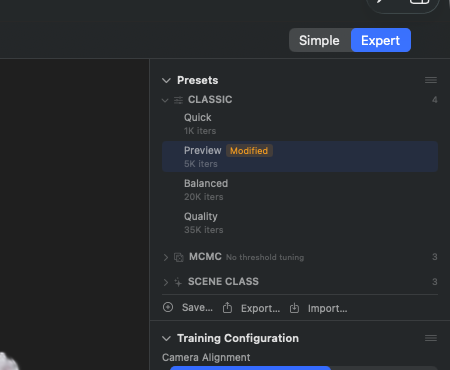
Presets section in the Inspector, all three main groups visible. CLASSIC group expanded with Quick (1K iters), Preview (5K iters, active selection with blue checkmark), Balanced (20K iters), Quality (35K iters). MCMC group collapsed with badge „3" (three presets inside) and subtitle „No threshold tuning" — MCMC needs no Densify-Until threshold. SCENE CLASS collapsed with badge „3" for the three auto-presets tuned in Q7 (Render/3D, Outdoor, Indoor). Footer action row: Save…, Export…, Import…
A preset is a prepared configuration for training. RadianceKit ships ten built-in presets — seven classics for standard scenes and three „Scene-Class" presets (P8–P10) that were tuned in Phase Q7 with Bayes optimization against real Mip-NeRF-360 and NeRF-Blender scenes. You choose them in the sidebar under Presets or in Simple mode during import. The + buttons open dialogs to create your own presets alongside — the ten built-in ones cannot be deleted, but can be duplicated.
In Expert view the presets appear grouped by strategy (Classic / MCMC / Scene-Class). A click on an entry writes the stored training configuration into the current state. This is not a snapshot — if you then turn sliders, the state changes, but the preset itself remains unchanged; a colored hint then shows „modified".
Which preset is the right one when depends mainly on scene type and hardware. The three tabular overviews at the end of the chapter sum this up.
P1 — Quick
WHERE
Inspector → Presets section → Group „Classic" → Entry „Quick". UUID suffix …001.
TECHNICAL
Diagnostic preset with 1 000 iterations, classic (adaptive) Densification strategy and a training resolution scaling of 0.25× (input image is downscaled to 25 % before training). Not intended to deliver a scene, but to quickly determine whether the setup (camera poses, point cloud, image series) shows any meaningful movement in the loss values at all. On an M3 Ultra typically under 30 seconds on 50–200 images. The small resolution obscures real image quality, but keeps memory footprint and render effort very low. Is also automatically selected as default on first launch when the system has less than 10 GB RAM.
P2 — Preview (Classic)
WHERE
Inspector → Presets section → Group „Classic" → Entry „Preview". UUID suffix …002.
TECHNICAL
5 000 iterations Classic Densification, 0.5× resolution scaling, doubled learning rates compared to standard. Densification (cloning + splitting) is active over the first 2 500 iterations, afterwards only pruning. Default preset for systems with ≥ 10 GB RAM. On an M3 Ultra typically 90 seconds to 3 minutes for a 200-image scene. Delivers a usable impression of geometry and camera pose, but textures are visibly soft — the 0.5× render resolution cannot be directly bypassed afterwards by retraining with P3 or P4, because the learning rates are calibrated to match the half resolution.
P3 — Balanced (Classic)
WHERE
Inspector → Presets section → Group „Classic" → Entry „Balanced". UUID suffix …005.
TECHNICAL
20 000 iterations Classic Densification at full image resolution. Densification runs over the first 15 000 iterations, from iter 3 000 with a densify interval of 100. Empirically the „sweet spot" from the documented training sessions: with classic Densification on Horse Full and Truck, L1 loss stabilizes between iter 18 000 and 22 000, longer training brings no significant improvement below Quality (P4). On an M3 Ultra typically 30–60 seconds on 200 images, 5–8 minutes on 1 000+ images.
P4 — Quality (Classic)
WHERE
Inspector → Presets section → Group „Classic" → Entry „Quality". UUID suffix …003.
TECHNICAL
35 000 iterations Classic Densification with V546 „Opacity Decay" (HTGS, Eurographics 2025): after every densify cycle the opacity of all existing Gaussians is multiplied by a factor < 1.0, which reliably removes Gaussians that have become inactive during pruning and thereby achieves 14 % better L1 loss at the same iteration count than the classic 35 000 run. SSIM loss is enabled (ssimWeight=0.05). On an M3 Ultra typically 2–4 minutes on 200 images. Achieves final L1 ≈ 0.023 on NeRF-Blender (Lego, Chair, Drums) — best Classic variant in the 560+ documented experiments. Note: needs ~3–5 GB GPU memory; on 8 GB systems P3 is the safe choice.
P5 — Preview (MCMC)
WHERE
Inspector → Presets section → Group „MCMC" → Entry „Preview". UUID suffix …006.
TECHNICAL
60 000 iterations MCMC Densification (3DGS-MCMC, NeurIPS 2024) at a cap of 100 000 Gaussians. MCMC replaces the heuristic clone/split logic with Markov chain Monte Carlo relocation: dead Gaussians are relocated via sigmoid-weighted sampling depths, which yields a controlled and reproducible number of Gaussians. The cap hard-caps the maximum count at 100K — this saves memory and render time, but costs detail. On an M3 Ultra typically 5–8 minutes on 200 images. Suitable as an „MCMC functional test" — helps you judge whether a switch from Classic to MCMC would make sense before you invest more time in P6 or P7.
P6 — Balanced (MCMC)
WHERE
Inspector → Presets section → Group „MCMC" → Entry „Balanced". UUID suffix …007.
TECHNICAL
120 000 iterations MCMC at a cap of 150 000 Gaussians. The middle MCMC level — almost the final Gaussian count of P7 Quality, but only 60 % of the iterations. Empirically the L1 loss in the documented training sessions is at 0.026–0.028 on Horse Full, compared to P7 with 0.0246 — so about 7 % higher, but half the wait time. On an M3 Ultra typically 8–15 minutes on 200 images. Uses a procedure that scales the effective Gaussian cap to the point density of the input SfM point cloud (see T75 in Chapter 6).
P7 — Quality (MCMC)
WHERE
Inspector → Presets section → Group „MCMC" → Entry „Quality". UUID suffix …004.
TECHNICAL
200 000 iterations MCMC at a cap of 150 000 Gaussians, SSIM loss 0.05, MCMC noise decay over 80 % of the iterations. Best single-run L1 in the 560+ experiments: 0.0238 on Horse Full, averaged over 3 trials 0.0246 (compared to P4 0.0230 on the same scene). MCMC delivers 71 % fewer Gaussians (150K vs ~524K) — crucial when you want to deliver the result on the web, because the smaller cloud produces noticeably smaller export files. Training time on an M3 Ultra typically 20–35 minutes on 200 images; on 1 000+ image sets more like 1–2 hours. Best choice when maximum image quality at minimal final size is desired.
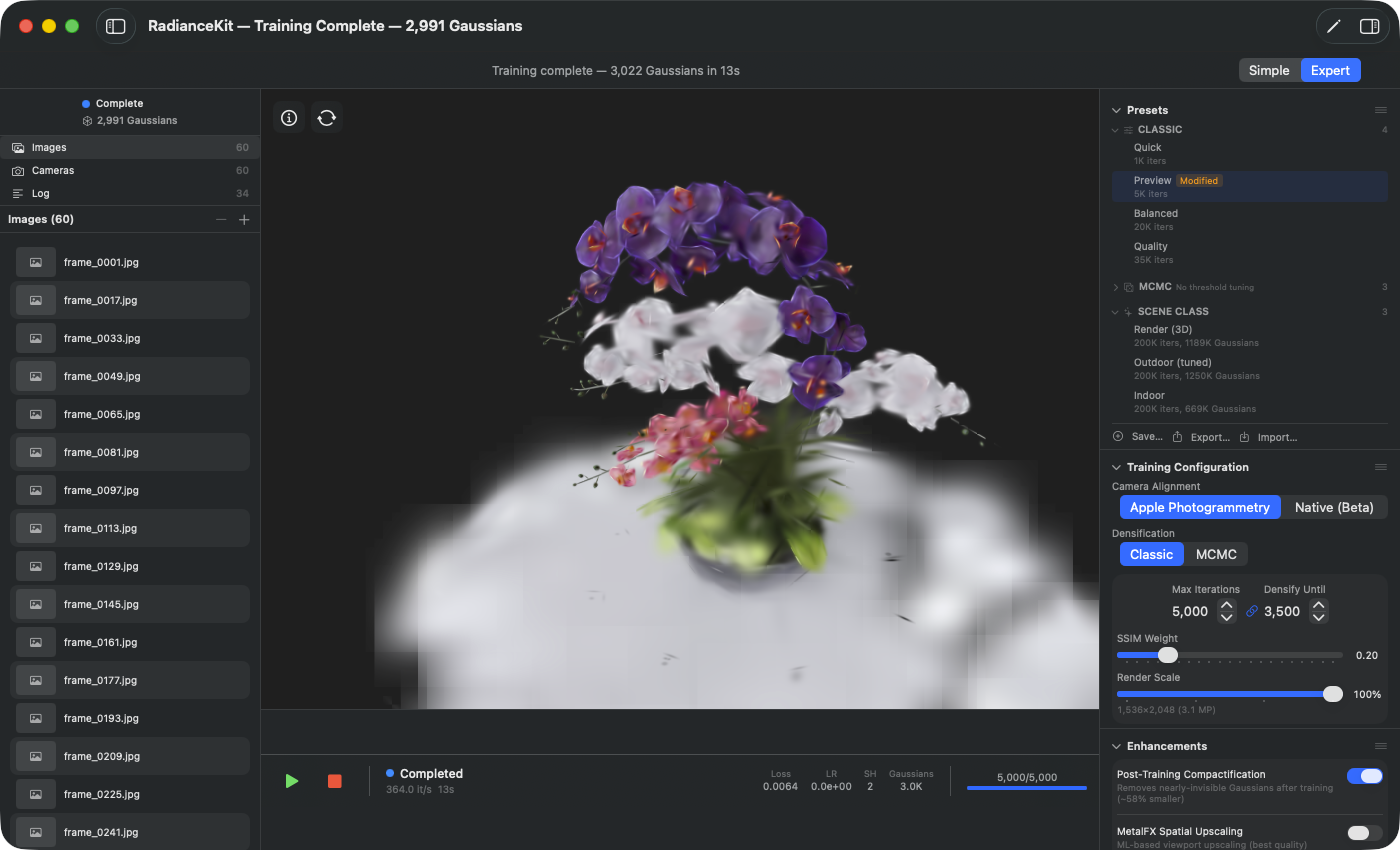
Inspector with the SCENE CLASS group expanded. Each preset entry lists name, iteration budget and final Gaussian cap. The high caps (669K to 1.25M) reflect the Q7 BayesOpt tunings, which empirically determined the optimal Gaussian density for the respective scene types. Selection by click writes the stored training configuration into the current state.
P8 — Render (3D)
WHERE
Inspector → Presets section → Group „Scene-Class" → Entry „Render (3D)". UUID suffix …700.
TECHNICAL
Scene-Class preset for image-synthetic / CGI-like scenes (NeRF-Blender, Mip-NeRF 360 Flowers, Blender-rendered test sets). Q7 BayesOpt sweep (Trial T10 on flowers, Seed 7, Budget 20) determined: mcmcMaxGaussians=1 189 511, mcmcCapMultiplier=2.98, ssimWeight=0.051, densifyGradThreshold=3.34e-06, mcmcNoiseScale=5.61e-05. Δ +0.36 dB PSNR compared to the Quality MCMC baseline (17.67 → 18.03). Mip-Splatting is deliberately off (Q1.5 „closed no-win" verdict 2026-05-25), Sky-Dome also off (synthetic scenes have no real sky). The main lever is the 8× larger Gaussian upper bound — synthetic scenes with clean alpha and dense textures react strongly to higher density. Training time on 200 images roughly like P7.
P9 — Outdoor (tuned)
WHERE
Inspector → Presets section → Group „Scene-Class" → Entry „Outdoor (tuned)". UUID suffix …701.
TECHNICAL
Scene-Class preset for outdoor captures with real sky and large depth range (Mip-NeRF 360 Bicycle/Garden, ETH3D Tunnel, drone flights). Q7 BayesOpt sweep (Trial T0 on bicycle, Seed 7, Budget 10) determined: mcmcMaxGaussians=1 250 744, mcmcCapMultiplier=5.32, ssimWeight=0.082, skyDomeRadiusMultiplier=59.0. Δ +1.40 dB PSNR compared to Quality MCMC (21.66 → 23.06) — all 9 valid bicycle trials broke the +1.0 dB threshold. Outdoor scenes react extremely strongly to higher Gaussian budgets (scaled depth range) and to the V549e Sky-Dome (spherically projected sky pixels around the scene). Cap multiplier 5.32 allows the MCMC relocation to sample more aggressively in distant image regions. Mip-Splatting deliberately off (Q1.5 verdict: even costs PSNR on outdoor). Recommendation in the UI with the suffix „(tuned)" — compared to the untuned Indoor counterpart, the quality jump is over four times as large.
P10 — Indoor
WHERE
Inspector → Presets section → Group „Scene-Class" → Entry „Indoor". UUID suffix …702.
TECHNICAL
Scene-Class preset for indoor spaces (Mip-NeRF 360 Bonsai/Kitchen/Room, Deep Blending playroom/drjohnson, ETH3D Storage Room). Q7 BayesOpt sweep (Trial T6 on bonsai, Seed 7, Budget 8) determined: mcmcMaxGaussians=669 215, mcmcCapMultiplier=1.76, densifyGradThreshold=1.67e-06, pruneOpacityThreshold=0.0142, ssimWeight=0.171. Δ +0.33 dB PSNR compared to Quality MCMC (29.63 → 29.96). 3/8 trials broke the +0.2 dB threshold, 8/8 valid (no stall thanks to the mtime stall guard). Indoor spaces react about half as strongly as outdoor — Δ +0.33 vs +1.40 dB — at about half the Gaussian budget (670K vs 1.25M). The reason: geometry bounded by walls saturates earlier; more Gaussians are wasted on flat wall surfaces. Cap multiplier 1.76 is deliberately chosen conservatively to avoid MCMC collapse (phenomenon from v1.4.3). Sky-Dome and Mip-Splatting both off.
Which preset when?
| Scenario | First test | Main run |
|---|---|---|
| Functional test of new images, < 30s | P1 Quick | — |
| Single-object scan, < 500 photos | P2 Preview | P4 Quality or P7 MCMC |
| Indoor space, 100–500 photos | P2 or P5 | P10 Indoor |
| Outdoor / drone / landscape, > 200 photos | P5 Preview MCMC | P9 Outdoor (tuned) |
| Blender/Cinema 4D renderings, NeRF-Blender test set | P5 Preview MCMC | P8 Render (3D) |
| Web delivery (small, compact) | P2 | P7 Quality MCMC (smallest file at full quality) |
| Print, marketing, full detail | P3 or P5 | P4 Quality (Classic) |
Quick comparison
| Preset | Strategy | Iters | Max-Gs | Render scale | Typical time (200 images, M3 Ultra) | Q-Sweep |
|---|---|---|---|---|---|---|
| P1 Quick | Classic | 1 000 | ∞ | 0.25× | ~30 s | — |
| P2 Preview | Classic | 5 000 | ∞ | 0.5× | 2–3 min | — |
| P3 Balanced | Classic | 20 000 | ∞ | 1.0× | 30–60 s | — |
| P4 Quality | Classic | 35 000 | ∞ | 1.0× | 2–4 min | V546 HTGS |
| P5 Preview MCMC | MCMC | 60 000 | 100 K | 1.0× | 5–8 min | — |
| P6 Balanced MCMC | MCMC | 120 000 | 150 K | 1.0× | 8–15 min | — |
| P7 Quality MCMC | MCMC | 200 000 | 150 K | 1.0× | 20–35 min | V544a |
| P8 Render (3D) | MCMC | 200 000 | 1.19 M | 1.0× | 25–45 min | Q7 T10 Δ+0.36 dB |
| P9 Outdoor (tuned) | MCMC | 200 000 | 1.25 M | 1.0× | 30–50 min | Q7 T0 Δ+1.40 dB |
| P10 Indoor | MCMC | 200 000 | 670 K | 1.0× | 25–40 min | Q7 T6 Δ+0.33 dB |
Custom presets
Via the Save… button in the Presets section (I1 in Chapter 2) you save the current training configuration as your own preset. Custom presets are not „Built-in" and can be renamed, exported (as JSON), shared via drag-and-drop, duplicated and deleted. The ten built-in presets P1–P10 remain untouched by the delete button.
Rule of thumb: If you change something on a preset that you'll want more often — Sky-Dome on, higher SSIM weight for a specific scene class, different iteration counts — then save the variant as your own preset. That way you know on the next run right away that it's a configuration that deviates from the standard.