Chapter 8 — Export Formats
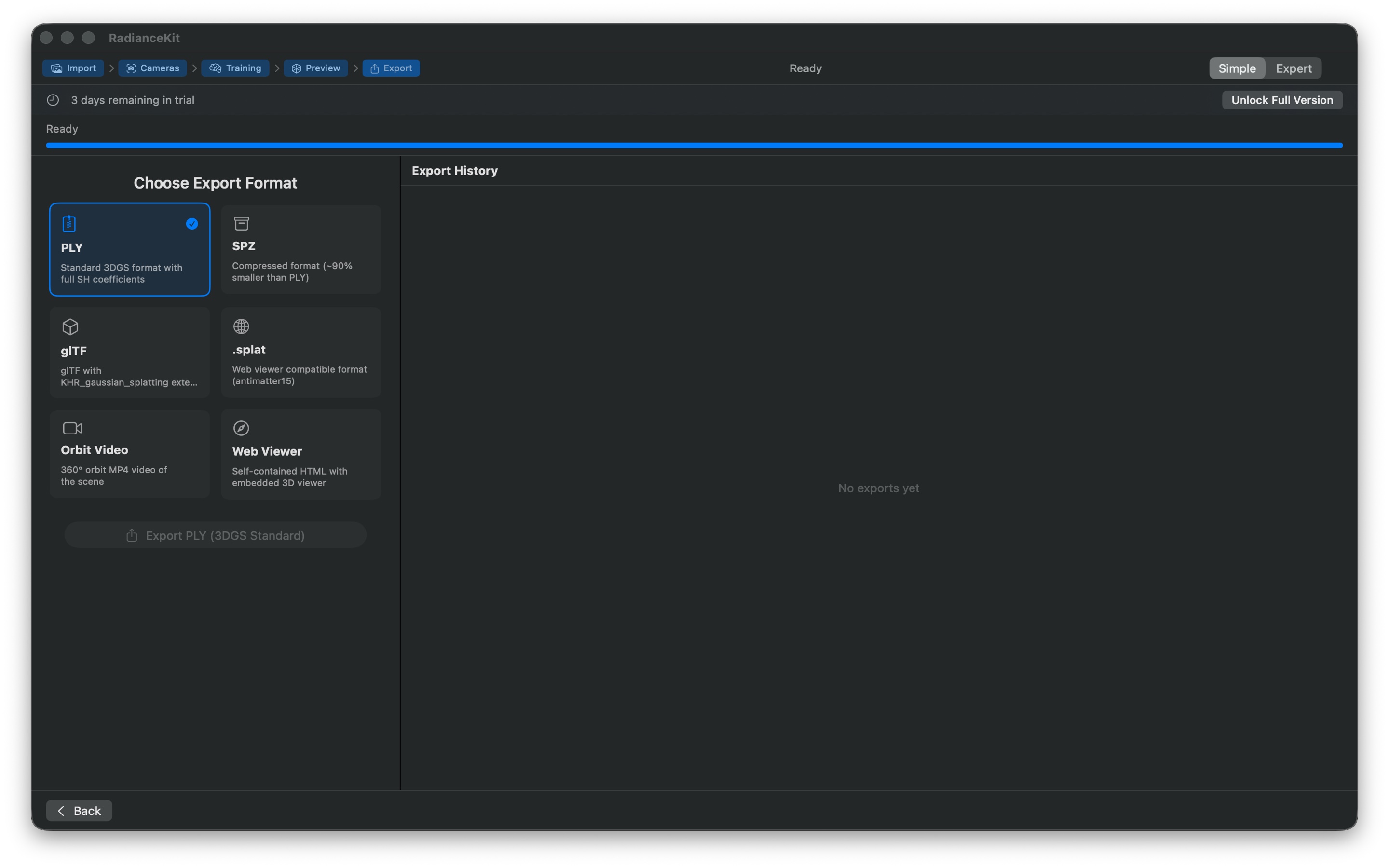
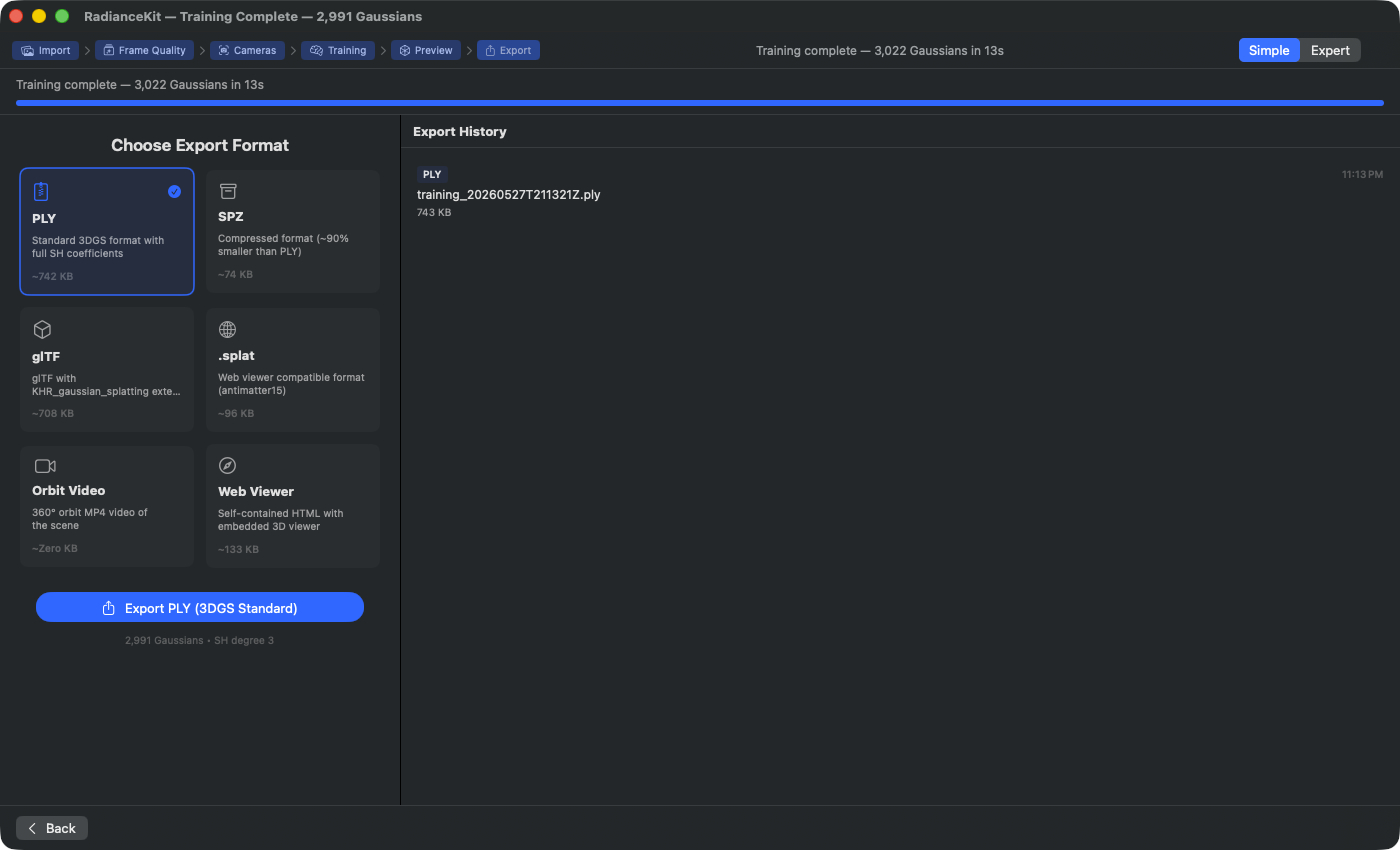
What's visible in the image: The size indication under each format tile is computed live from the current Gaussian count and the format overhead — not hardcoded. The same scene produces 2.2 MB PLY, 142 KB cPLY, 89 KB SOG, 216 KB SPZ, 2.1 MB glTF and 279 KB .splat; Web is somewhat larger at 378 KB, because the viewer is bundled inside the file there. Video and Wiggle show "Zero KB", because the size is only known after encoding. The selected tile is outlined in blue, and the button below it takes on its name — here "Export PLY (3DGS Standard)". Below the heading is the line "Leveling the floor turns the view at once; the chosen orientation and format apply when saving".
A completed training run produces a Gaussian cloud — a collection of anywhere from a few hundred thousand to millions of 3D Gaussians that together reconstruct the scene. This chapter describes ten ways to write this cloud to disk. Six of these are pure 3D data formats (PLY, Compressed PLY, SPZ, SOG, glTF, .splat), one bundles the cloud together with a ready-made HTML viewer (Web Viewer), one renders an MP4 file from an orbit camera path (Orbit Video), and two export no Gaussian content but only the SfM result (camera poses and rough point cloud) for reuse in other training pipelines (transforms.json + COLMAP workspace).
Eight of these paths are available as a tile in the export section — transforms.json and the COLMAP workspace are only found in the menu. In addition, the grid contains a ninth tile Wiggle, and below the export button is Upload to SuperSplat…, which sends the scene straight to the SuperSplat editor on the web instead of into a file.
Which format is right depends on the target. For archiving the full data without quality loss, use PLY. For web viewers on your own site, .splat or the built-in web viewer usually suffice. If the file needs to be minimal, SPZ or SOG are worth it. For reusing the SfM result in Nerfstudio, Postshot, or Brush, transforms.json and the COLMAP workspace are the right paths.
All export functions are found in the "Export" menu as well as in Simple Mode on the final wizard step. Most formats are fully sandbox-compliant and work in the App Store version. SOG and separate Skyboxes are also encoded directly as WebP by the app; no additional installation is required.
Separate Skybox (2:1 WebP)
If Reconstruct Sky Dome → Separate Skybox was selected for training, Expert export also shows Export Skybox Package…. The normal PLY, SPZ, SOG, glTF, .splat, or Web export then deliberately contains no sky splats. The package instead contains an equirectangular 2:1 panorama, a lossless working image, and masks that distinguish real from missing areas. Load the finished WebP in SuperSplat Studio as a Skybox under Assets, and import the 3D model separately.
RadianceKit closes a single small hole directly at the zenith automatically. For a larger gap, the package initially exports the real partial sky and its masks, but no WebP presented as complete. Complete the 2:1 working image in a suitable image tool, then choose Import Completed Panorama…. If the app instead asks for more sky coverage, capture the missing directions and train again; an image tool must not invent them. RadianceKit accepts only pixels previously marked as missing sky; the captured horizon and every real sky pixel remain unchanged. Missing ground, buildings, or vegetation are never completed.
E1 — PLY (.ply)
WHERE
Menu bar → Export → 3D Formats → Export PLY… (⌘E). Simple mode: Wizard step Export → format card "PLY". Size: typically 100 % (reference value). Compatible with: SuperSplat, PolyCam, all 3DGS viewers.
TECHNICAL
PLY is the canonical storage format for 3D Gaussian Splatting. RadianceKit writes a binary little-endian file with the standardized 3DGS property layout: per Gaussian, a three-component position, three normals always set to zero, three DC SH coefficients (f_dc_0..2) for the base RGB color, followed by up to 45 additional SH coefficients (f_rest_0..44) in the transposed channel-major arrangement defined by the Kerbl 2023 paper (first all R-channel coefficients, then all G, then all B), followed by logit opacity (raw pre-sigmoid values), three log-space scales, and a wxyz quaternion rotation. The maximum exported SH degree is clamped to the minimum of the user's request and the actually learned degree; the default is 3 (45 rest coefficients). Before writing, the payload size is computed as a 64-bit integer to catch overflow in extremely large clouds. The file is written atomically, which for large clouds temporarily occupies double the disk space.
E2 — Compressed PLY (.ply)
WHERE
Menu bar → Export → 3D Formats → Export Compressed PLY…. Simple mode: format card "Compressed PLY". Size: approx. 10–20 % of PLY (5- to 10-fold compression). Compatible with: SuperSplat, PlayCanvas engine, web-based viewers.
TECHNICAL
The PlayCanvas variant of the PLY format with chunked quantization. The Gaussians are grouped into chunks of 256. Per chunk, min/max bounds for position, scale, and color are stored separately in the header; the individual Gaussians reference their values relative to these bounds and are compressed to 32 bits each: position and scale with 11-10-11-bit packing, rotation as a 2-10-10-10-bit "smallest three" quaternion, color as 8-8-8-8 RGBA. Higher SH coefficients are quantized with only 8 bits per component (three bytes per coefficient and Gaussian). The format itself is still ASCII-header PLY and thus in principle validatable with PLY tools, but the vertex properties are declared as uint fields. SH degree defaults to 0 (no rest coefficients) to maximize compression — higher SH degrees can be explicitly selected.
E3 — SPZ (.spz)
WHERE
Menu bar → Export → 3D Formats → Export SPZ…. Simple mode: format card "SPZ". Size: approx. 10 % of PLY (90 % smaller). Compatible with: Niantic Scaniverse, Niantic Spatial Fields, MetalSplatter.
TECHNICAL
Niantic's SPZ v2 format. Positions are packed as 24-bit fixed-point (giving approx. 0.25 mm resolution), scales as 8-bit quantization in log space, rotations as 8-bit smallest-three (in v2 only xyz are stored, w is derived in the decoder from the quaternion norm), opacities as sigmoidized 8-bit values. DC SH is stored using an SPZ-specific pack formula (dc_raw * 0.15 * 255 + 0.5 * 255), higher SH bands with 5 bits (band 1) resp. 4 bits (bands 2-3) per coefficient. The entire packed binary blob is then compressed with standard gzip (RFC 1952), resulting in a gzipped container format with magic bytes 1f 8b. RadianceKit invokes the system gzip for this, because Apple's built-in zlib API produces proprietary Apple framing that would not be compatible with the SPZ readers in Spatial Fields or MetalSplatter. The system gzip remains spawnable even inside the macOS sandbox.
E4 — SOG (.sog)
WHERE
Menu bar → Export → 3D Formats → Export SOG…. Simple mode: format card "SOG". Size: approx. 5–6 % of PLY (15- to 20-fold compression — the smallest option). Compatible with: PlayCanvas engine, SuperSplat editor.
TECHNICAL
“Spatially Ordered Gaussians" — a PlayCanvas format that stores the cloud GPU-ready in several lossless WebP images. First, all Gaussians are spatially sorted via a 3D Morton code (30-bit Z-order, 10 bits per axis), which gives the images later cache locality in the renderer. Then positions are quantized to 16-bit values with a symmetric log transform (for better dynamic range) and split into two RGBA images (means_l.webp for the lower 8 bits, means_u.webp for the upper). Rotations are encoded as smallest-three with 3×8 bits plus a 2-bit mode in an RGBA image (mode ends up in alpha as 252 + largest). Scales and DC SH are quantized with a 256-entry codebook each (percentile-based, distributed across all values), the indices end up in scales.webp and sh0.webp. The five images plus a meta.json with codebooks and bounds are packed into a ZIP file (custom encoder, because the sandbox blocks the system zip) and saved with the extension .sog.
The WebP images are generated entirely within RadianceKit. The export does not launch an external program and requires neither Homebrew nor an additional tool. The App Store and direct versions therefore produce the same SOG file contract.
E5 — glTF (.glb)
WHERE
Menu bar → Export → 3D Formats → Export glTF…. Simple mode: format card "glTF". Size: comparable to PLY. Compatible with: glTF viewers with the KHR_gaussian_splatting extension (Khronos draft standard).
TECHNICAL
Writes a self-contained .glb binary file (no separate bin file attachment) according to the KHR_gaussian_splatting extension specification. Positions are stored as regular glTF POSITION vertex data (float3), all other attributes (rotation as float4, scale as float3, opacity as float, SH coefficients as float3 × shCoeffCount) reside in additional vertex attributes and are referenced via the extension. Important: glTF uses a right-handed Y-up coordinate system, while COLMAP/3DGS works in Y-down/Z-forward. The exporter therefore applies a 180-degree rotation around the X axis — positions are rewritten as (x, -y, -z), quaternions are adjusted to (w, x, -y, -z). This yields a geometrically correct, right-handed (not mirrored) representation in glTF viewers. JSON and binary chunks are padded to 4-byte alignment, as required by the GLB standard.
E6 — Splat (.splat)
WHERE
Menu bar → Export → 3D Formats → Export .splat…. Simple mode: format card ".splat". Size: exactly 32 bytes per Gaussian. Compatible with: gsplat.js, web-based viewers (antimatter15 reference), most browser 3DGS demos.
TECHNICAL
The antimatter15 .splat format — 32 bytes per Gaussian, no header, no indirection. Layout per entry: 3 × float32 position (world coordinates), 3 × float32 scale (exp-transformed from the log space of the internal buffer), 4 × uint8 RGBA color (DC SH coefficient scaled by SH_C0 = 0.282... and clamped to [0,255]), 4 × uint8 quaternion (w,x,y,z, normalized and encoded into the byte range as 128 + 128*q). Only DC SH is stored — higher SH bands are discarded. This makes the format extremely compact, but costs the view-dependent color changes that occur with reflections or specular highlights. The write order is exactly the index order of the cloud (no spatial sorting), web viewers such as gsplat.js render based on this.
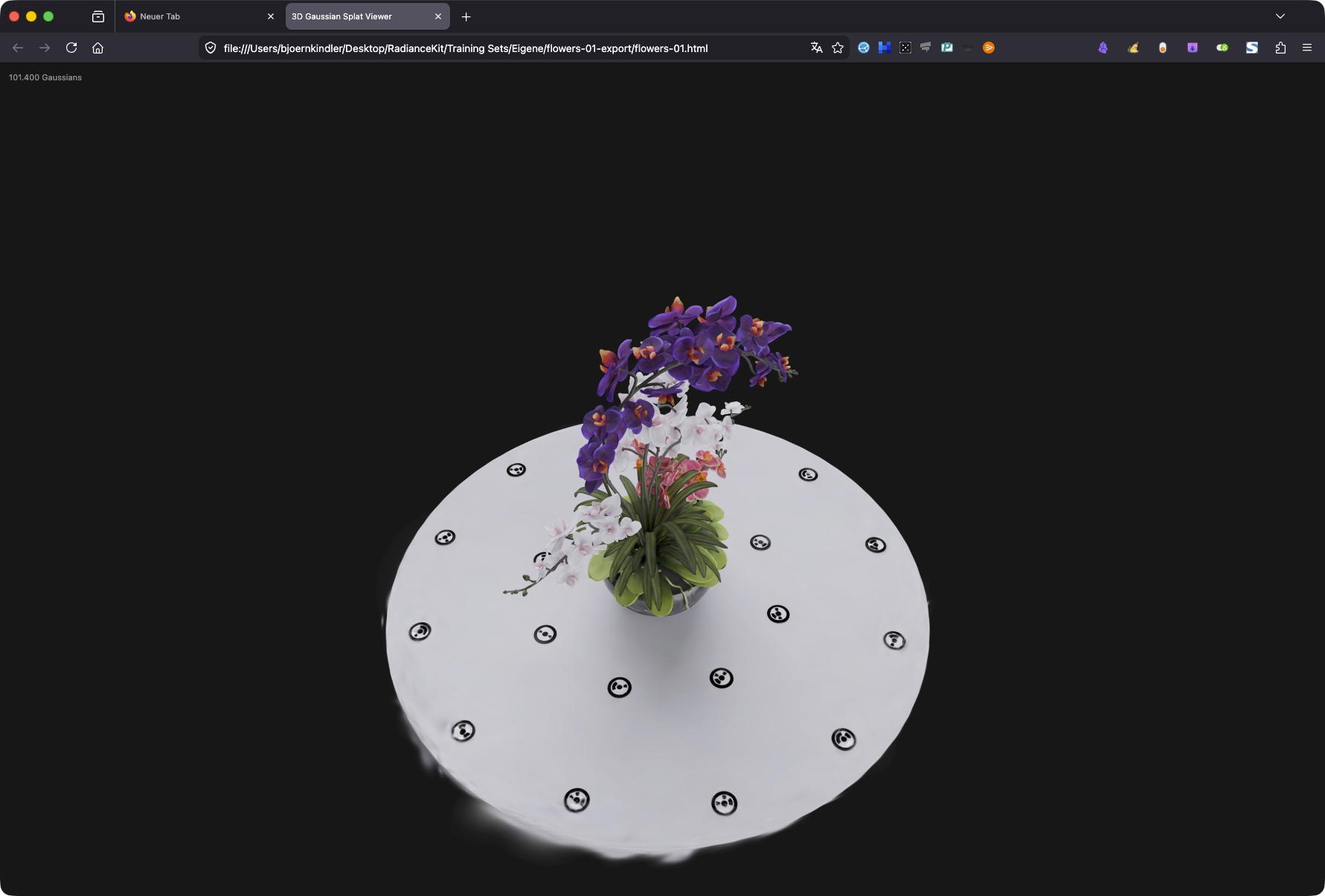
flowers-01.html opened directly from Finder via double-click in the default browser — the embedded WebGL2 program renders the Gaussian cloud instantly, without network or server. The black markers around the bouquet are the training cameras, optionally displayable. Mouse drag rotates, scroll zooms.E7 — Web Viewer (.html)
WHERE
Menu bar → Export → Media → Export Web Viewer…. Simple mode: format card "Web Viewer". Size: splat data base64-encoded (≈ 4/3 overhead) + approx. 5 KB HTML/JS shell. Compatible with: any modern browser with WebGL2 (all desktops, iOS 15+, Android 5+).
TECHNICAL
Bundles the Gaussian cloud together with a fully inline-written WebGL2 renderer into a single .html file. There are no CDN dependencies, no WASM, no second file. The cloud is first encoded internally as a .splat binary (same 32-byte logic as E6), then base64-embedded, then decoded with atob in the browser. The built-in renderer does its own WebGL2 sorting, mouse orbit controls, and CPU sorting per frame; the entire JS code (shaders, math, loop) is visible in the output HTML. The axis convention at the storage-to-renderer boundary is exactly the same as in E5: position (x, -y, -z), quaternion (w, x, -y, -z). Optionally, a branding overlay can be displayed (free-tier switch). Since everything is inline, the file also works directly from the file:// protocol — no local web server needed for testing.
E8 — Orbit Video (.mp4/.mov)
WHERE
Menu bar → Viewport → Record Turntable Video OR Menu bar → Export → Media → Export Orbit Video…. Simple mode: format card "Orbit Video" with duration slider 3–30 s. Size: dependent on duration, resolution, bitrate. Compatible with: all platforms (H.264 and HEVC are Apple standard).
TECHNICAL
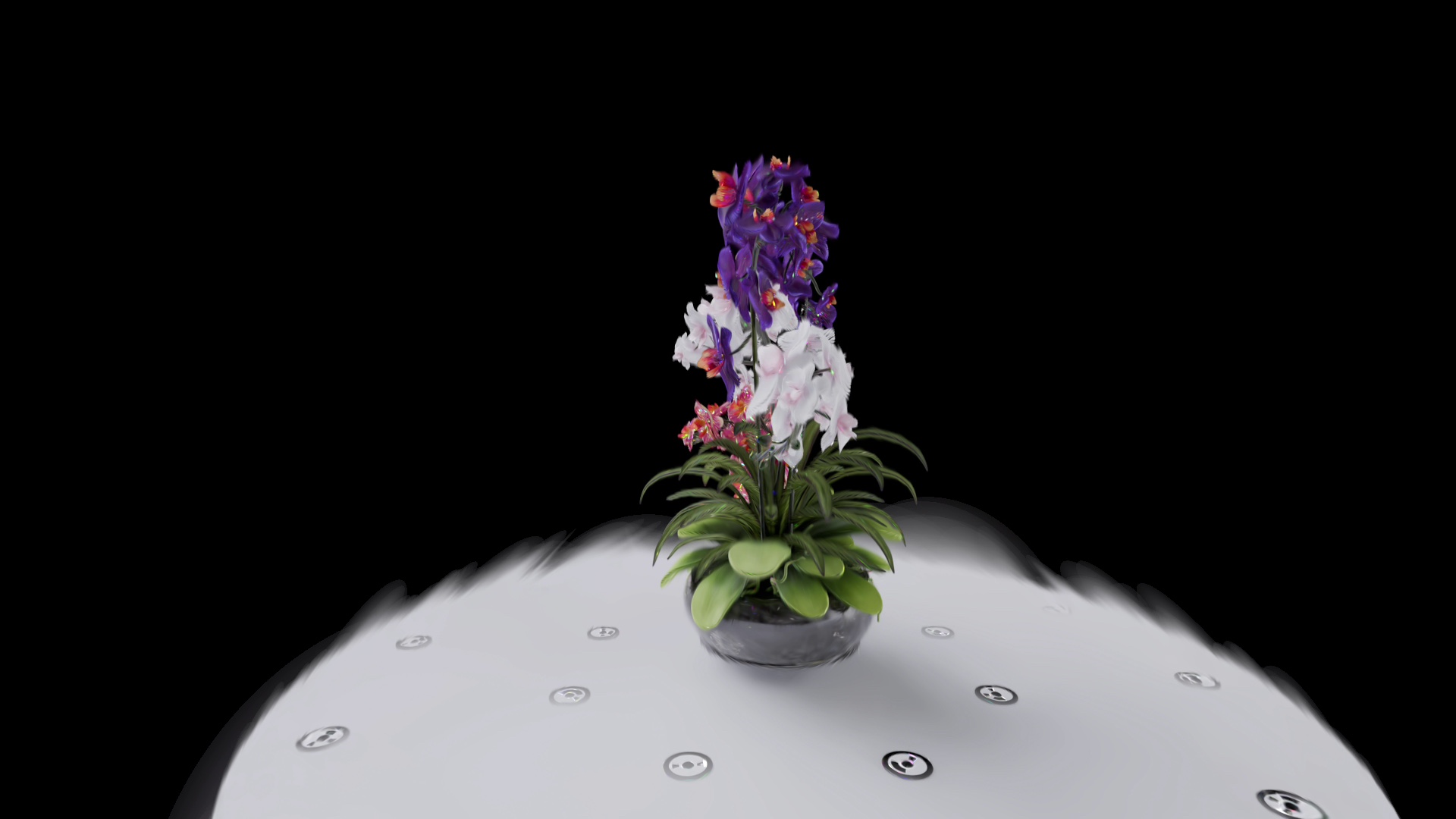
Renders the Gaussian cloud along a parametric orbit camera path and encodes each frame via AVAssetWriter into an MP4 or MOV file. The orbit configuration controls rotation speed (revolutions), distance, elevation, FOV, duration, and ease-in/out factor. The orbit video export runs through RadianceKit's OWN render stage with full SH evaluation — pixel-identical to the in-app viewport (WYSIWYG). Per frame, the world adjustment matrix (computed by the renderer to rotate the internal coordinates into the Y-up orbit world) is multiplied with the camera, then a camera conversion mirror (orbit Y-up → COLMAP Y-down) is applied. The offscreen render target is pulled via IOSurface into a CVPixelBuffer for the encoder. The encoder supports H.264 and HEVC, configurable bitrate, and resolution from 480p to 8K. Before the first frame, the renderer waits 200 ms so the initial splat sorting completes. This export is GPU-bound — at 8K and millions of Gaussians, the render time per frame is several seconds, so total render times of 10–30 minutes are possible for a 6 s video.
E9 — SfM Transforms (transforms.json)
WHERE
Menu bar → Export → Photogrammetry → Export SfM (transforms.json)…. Size: typically 1–10 KB (only poses + intrinsics, no images, no Gaussians). Compatible with: nerfstudio, Brush, gsplat, OpenSplat, Meshroom, all modern feed-forward 3DGS trainers.
TECHNICAL
Writes the nerfstudio transforms.json format with a list of camera poses plus shared intrinsics. Per camera, the view matrix (RadianceKit-internal: world-to-camera in COLMAP convention) is inverted, then the camera-local Y and Z basis vectors are mirrored to convert into the nerfstudio convention (OpenGL style, camera looks along -Z, +Y is up). The final 4×4 matrix ends up as a row-major nested array of doubles in the transform_matrix field of each frame. Intrinsics are stored at the top level (focal length x/y, principal point x/y, image width/height, camera_model = "OPENCV", plus the distortion coefficients k1, k2, p1, p2) — unless the exporter detects several different intrinsics sets, in which case they are written per frame. Image paths are written as images/<filename> relative to the JSON file; the user must create a sibling images/ folder with the training photos.
E10 — COLMAP Workspace (sparse/0/)
WHERE
Menu bar → Export → Photogrammetry → Export SfM (COLMAP Workspace)…. Size: three binary files together typically 4–8 MB — points3D.bin dominates (one line per 3D point of the sparse cloud), images.bin and cameras.bin are each well under 100 KB. Compatible with: COLMAP itself, Nerfstudio, Postshot, Meshroom, all tools that expect a COLMAP sparse/ directory.
TECHNICAL
Writes the standard COLMAP sparse/0/ layout with three binary files: cameras.bin, images.bin, points3D.bin. The format reference is the official COLMAP documentation. cameras.bin contains the deduplicated intrinsics list (cameras with identical intrinsics + image size are merged into a single entry); the camera model used is OPENCV (model 4), with fx/fy/cx/cy plus the four distortion coefficients k1/k2/p1/p2. images.bin lists, per image, the pose as a wxyz quaternion plus translation, followed by the camera ID and the filename; no 2D-3D correspondences are stored. points3D.bin contains the SfM point cloud with position, color (0-255 RGB), and default values for reprojection error and track length. Everything is written in little-endian. Re-import into RadianceKit works via the File menu → "Import COLMAP/Metashape Workspace…" (see Q3 in the SfM backend chapter).
Which Format When?
| Target | Format |
|---|---|
| Web viewer on your own page | E7 Web Viewer (.html) |
Web viewer with gsplat.js | E6 Splat (.splat) |
| Pipeline reuse in Postshot / Nerfstudio | E9 transforms.json + E10 COLMAP Workspace |
| SuperSplat editing | E1 PLY or E2 Compressed PLY |
| Niantic Scaniverse / Spatial Fields | E3 SPZ |
| Maximum compression | E4 SOG |
| Marketing/social video | E8 Orbit Video |
| Continue editing the scene online | „Upload to SuperSplat…" button below the format grid |
Quick Comparison
| Format | Extension | Sandbox | Size (1M Gauss) | Best use |
|---|---|---|---|---|
| E1 PLY | .ply | yes | ~250 MB | Archive, highest compatibility |
| E2 Compressed PLY | .ply | yes | ~40 MB | Web + SuperSplat |
| E3 SPZ | .spz | yes (gzip spawn) | ~40 MB | Niantic + Mobile |
| E4 SOG | .sog | yes | ~20 MB | Maximum compression |
| E5 glTF | .glb | yes | ~250 MB | Khronos pipeline |
| E6 Splat | .splat | yes | ~32 MB | gsplat.js web viewer |
| E7 Web Viewer | .html | yes | ~45 MB | Standalone browser file |
| E8 Orbit Video | .mp4/.mov | yes | variable | Social/Marketing |
| E9 SfM Transforms | .json | yes | ~5 KB | Pose transfer |
| E10 COLMAP Workspace | Directory | yes | ~4–8 MB | Pose transfer (binary) |
Size column values are rough guidelines for 1 million Gaussians with SH degree 3. Real-world values vary depending on the compressibility of the scene; SH degree 0 reduces PLY/glTF by a factor of 4.