Chapter 9 — SfM Backends
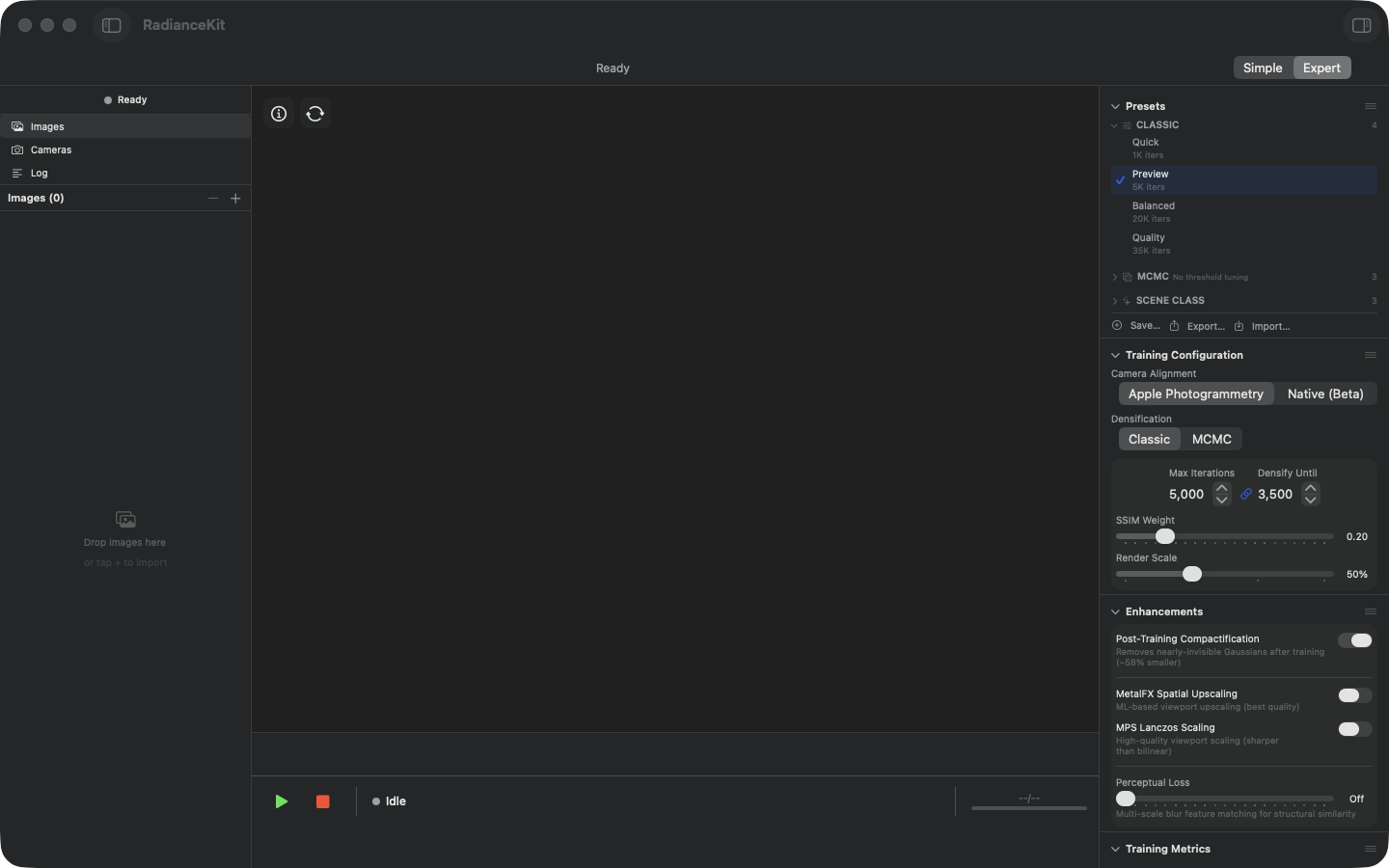
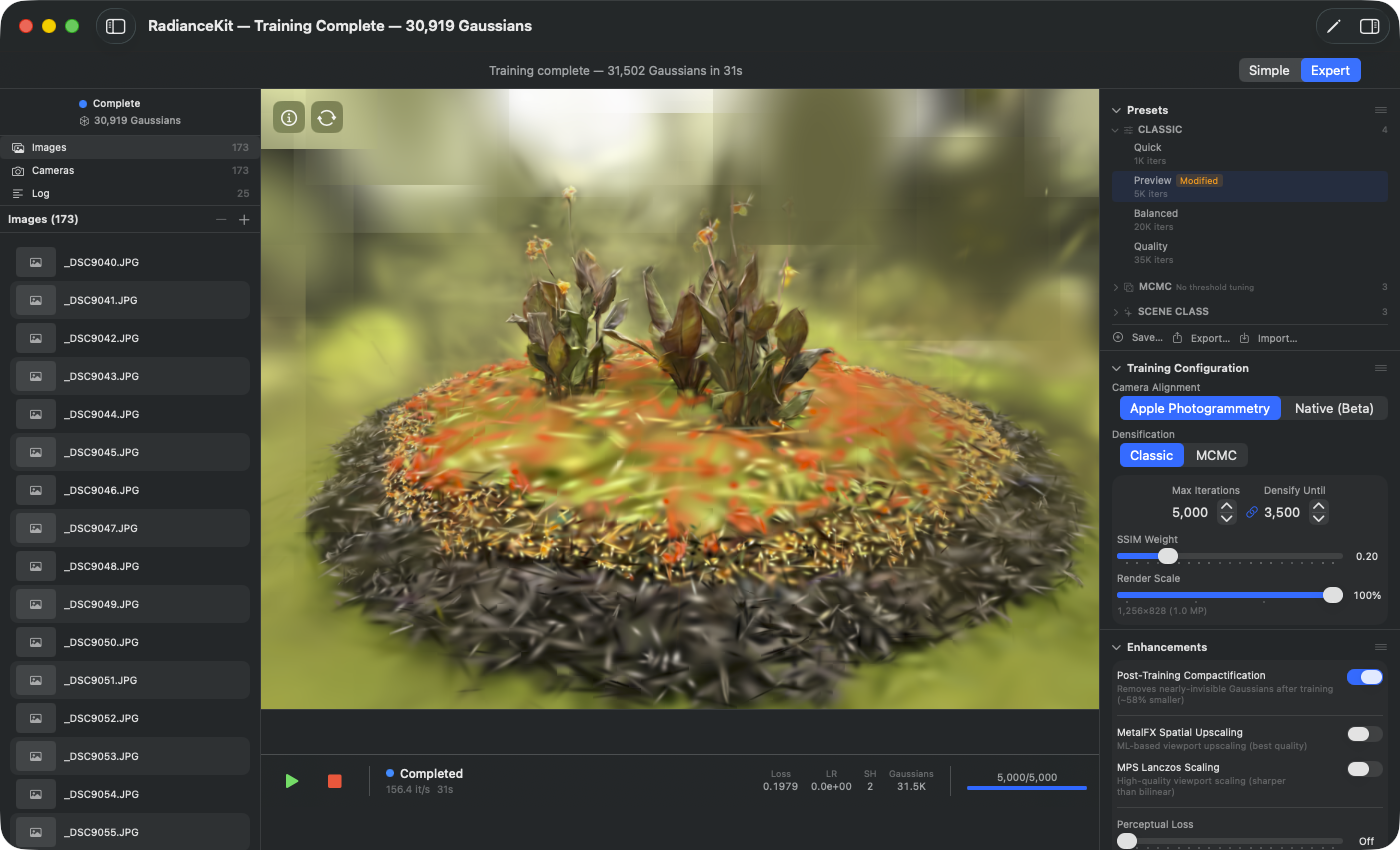
The Camera Alignment picker in the Inspector is a segmented control with two options — Apple Photogrammetry (default for App Store builds, fully sandbox-compliant) and Native (Beta) (RadianceKit's own FAST+BRIEF+GLOMAP pipeline backend, developed during Phase 3.8/3.9, as of 2026-05). Native (Beta) is orbit-only validated and faster than Apple Photogrammetry with ≥1 000 frames, but does not yet meet the Phase-3 §5 quality gate (finalLoss ≤ 0.0115) — hence the Beta tag. External SfM results from Metashape, COLMAP or any other photogrammetry software can additionally be imported via the File menu (Q3 COLMAP text format, Q6 Workspace Import) — the picker does not switch, but the imported poses replace the SfM result.
SfM stands for Structure from Motion. From a set of overlapping photos, the software reconstructs for each image the position and view direction of the camera in a shared 3D coordinate system. In the process, a coarse 3D point cloud is generated, which initializes training with Gaussian Splatting. The SfM result is the input for the actual training and decisively determines the later image quality.
RadianceKit offers five SfM paths: two backends built into the app (Q1 Apple Photogrammetry, Q4/Q5 Native), two import paths from external tools (Q3 COLMAP text format, Q6 binary Workspace Import) as well as Q2 COLMAP binary, which is only available in developer builds outside the App Store. Which is the right one depends on the scene type (orbit around an object, indoor space, drone flight) and on whether external software already provides a reconstruction.
Q1 — Apple Photogrammetry
WHERE
Expert View → Inspector → Training Configuration → Camera Alignment picker, entry "Apple Photogrammetry".
TECHNICAL
Wraps Apple's built-in photogrammetry framework, originally developed for Object Capture. Apple internally extracts features with a proprietary pipeline (steps are not publicly documented), verifies them via multi-view matching, and solves bundle adjustment on the Apple Silicon Neural Engine + GPU. The backend is fully App Store compliant (no external binary, Sandbox=true, on-device), but only delivers camera poses plus a coarse point cloud — no diagnostic metrics like track length or reprojection error. Scales according to Apple's recommendation up to a few hundred images. With more than ~500 frames in linear drone flights or large outdoor scenes, reproducible crashes or silent dropping of individual cameras have been observed.
Q3 — COLMAP text format (Metashape / ETH3D)
WHERE
Menu "File → Import COLMAP / Metashape Workspace…" (Cmd+⇧+I) OR drag-and-drop of a folder with sparse/0/cameras.txt.
TECHNICAL
Reads the standardized COLMAP text export — three text files cameras.txt, images.txt, points3D.txt in the sparse/0/ subfolder — and converts to the internal SfM result model. Same format definition as the COLMAP binary export, just as ASCII instead of binary. Exported by Agisoft Metashape, RealityCapture, PolyCam and the ETH3D benchmark in exactly this layout. The parser shares camera model detection with the binary parser (all common models: SIMPLE_PINHOLE, PINHOLE, OPENCV, OPENCV_FISHEYE, FULL_OPENCV). Robust against comment lines and empty lines. Scales in tests up to ~1 400 cameras (ETH3D Tunnel) without issues.
Q4 — Native SfM (incremental)
WHERE
Expert View → Inspector → Training Configuration → Camera Alignment picker, entry "Native (Beta)". Incremental is the default mode of this backend — there is no separate mapper picker in the Inspector. Via CLI the mode can be set explicitly with –native-sfm or –sfm-mapper incremental.
TECHNICAL
Own GPU-accelerated implementation of the entire SfM pipeline: FAST+BRIEF features OR SuperPoint+LightGlue via CoreML (with –coreml-features), followed by Hamming-KNN matching, RANSAC fundamental matrix, track building, initial pair selection, two-view bootstrap (F→E plus DLT), greedy incremental mapper with PnP registration and multi-view triangulation, and final bundle adjustment via Schur-reduced Levenberg-Marquardt with Huber loss and analytical Jacobians via Cholesky solve. Fully App Store compliant: no external binary, Sandbox=true. With the R2 collapse detector shipped in Phase 3.10: if the app registers fewer than 60 % of the input frames or the points-per-camera rate falls below 13, it automatically falls back to the global mapper (Q5). Empirically clean on orbit/turntable scenes; on more general motions (drone flight, indoor spaces with complex geometry) the success rate is lower — the detector catches these cases, though. Scales reliably up to ~200 cameras, higher with significantly longer runtime.
Q5 — Native SfM (global)
WHERE
Is called automatically when the incremental mapper (Q4) triggers the collapse detector (fewer than 60 % of input frames registered or points-per-camera rate below 13). Manually forceable only via CLI –sfm-mapper global. In the Inspector the global method is not reachable via a separate picker — the app decides on its own when to switch.
TECHNICAL
Global variant of the native pipeline. First feature extraction + matching as in Q4, then relative pose estimation for all verified pairs, followed by rotation averaging (synchronizes all camera rotations in the world coordinate system) and translation averaging (LSQR-based on a matrix-free sparse formulation to avoid integer overflow with large camera counts). Scales to ~5 000 cameras in principle, in practice quality-degraded above a few hundred cameras — the Phase 3.8 §5 acceptance gate measurement on K-1351 gave finalLoss 0.07 instead of the targeted 0.0115. Treated as a "fallback tier": comes into play when the incremental mapper degenerates, but is not itself re-checked for quality.
Q6 — Metashape / COLMAP text workspace import (Phase Q7)
WHERE
File menu → "Import COLMAP / Metashape Workspace…" (Cmd+⇧+I). Drag-and-drop of a folder with sparse/0/cameras.{bin,txt} and images/.
TECHNICAL
Automatically detects whether a folder selected via drag-and-drop or open panel matches one of the three COLMAP workspace layouts (sparse/0/, sparse/, or root) and whether the reconstruction is binary (cameras.bin) or text (cameras.txt). The binary path uses the COLMAP binary parser, the text path the ETH3D loader — both produce the same SfM result model and the rest of the pipeline (import images, start MCMC training) is agnostic to the source. The images are opened via the app sandbox bookmark system security-scoped, so the import also works in the App Store version. Specifically intended for the case "Metashape export without recomputing reconstruction". The detection mentioned in the File menu entry warns in the app log if the chosen folder is not a recognizable workspace.
Which backend when?
| Scenario | Recommended backend |
|---|---|
| Object scan, 50–200 photos | Q1 Apple Photogrammetry |
| Large outdoor / drone / >500 images | Q6 Workspace Import (compute in Metashape or COLMAP, then load) |
| Metashape/RealityCapture export available | Q6 Import (no SfM needed) |
| ETH3D / academic COLMAP text set | Q3 COLMAP text import |
| Strictly App Store compliant + orbit scene | Q4 Native incremental |
| Q4 fails | Q5 Native global (automatic) |
| ETH3D benchmark data | Q3 (autotest precomputed) |
Quick comparison
| Backend | App Store | Sandbox | External binary | Best Use | Max ~Cams |
|---|---|---|---|---|---|
| Q1 Apple PG | ✅ | ✅ | — | Orbit-Object | ~300 |
| Q2 COLMAP Binary | ❌ (developer build only) | — | colmap/glomap | Outdoor large | ~5 000 |
| Q3 COLMAP text import | ✅ | ✅ | — | Bench rigs | ~1 500 |
| Q4 Native incremental | ✅ | ✅ | — | Orbit-Object | ~200 |
| Q5 Native global | ✅ | ✅ | — | Q4 fallback | ~1 351 |
| Q6 Workspace Import | ✅ | ✅ | — | Metashape reuse | per source |